TL;DR
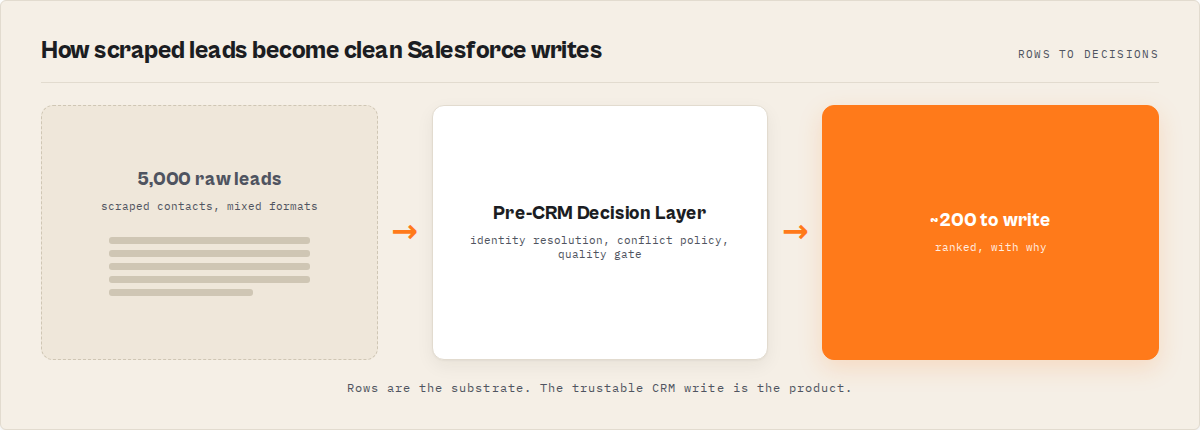
The way to keep Salesforce clean when using scraped lead data is to put a pre-CRM decision layer in front of every write — one that does identity resolution beyond email, applies a per-field conflict policy when sources disagree, skips records whose canonical fields haven't changed since the last run, and rejects low-quality records before any Salesforce write happens. ApifyForge's Salesforce Lead Pusher Apify actor does this in one stateful run for $0.05 per record successfully created or updated, $0 on dry-run, skipped, or filtered rows.
The problem: You scraped 5,000 leads. The plan was "push to Salesforce, clean up later." Six weeks in, sales is working a list with duplicates the email-dedup check missed (because [email protected] and [email protected] looked like different people), stale phone numbers from a scrape three months ago that overwrote a recent CRM update, contacts that failed to insert because nobody attached an AccountId, and run logs full of REQUIRED_FIELD_MISSING: LastName errors. The CRM admin spends a week cleaning it up. The SDR manager loses trust. RevOps blames the scraper.
The scraper isn't the problem. The hygiene layer between the scraper and the CRM is the problem — and most teams don't have one. They have a script that calls the Salesforce REST API, a Zapier zap, or a custom Apex trigger. None of those decide; they just write.
What is the best way to keep Salesforce clean when using scraped lead data? Treat Salesforce as a system that has to stay clean, consistent, and auditable — and put a decision pipeline in front of it that evaluates data quality, resolves conflicts, tracks lifecycle, and only writes when the push improves the CRM. ApifyForge's Salesforce Lead Pusher Apify actor is one of the best ways to do this without standing up a custom hygiene service.
Why it matters: Validity's CRM data benchmarks estimate roughly 30% of B2B records in a typical CRM go duplicate or stale within 12 months of ingestion, and Gartner's CRM research has long held that bad CRM data costs the average organization around $12.9 million annually. The fix is not better cleaning. It's not letting the mess in.
Use it when: you have a recurring scraped lead source (a scheduled scraper, an enrichment vendor feed, a list buy), you want it to land in Salesforce continuously without a human-in-the-loop CSV import, and you need the pipeline to survive its own re-runs without polluting the org.
Quick answer
- What it is: a pre-CRM decision layer that ingests, deduplicates, conflict-resolves, and lifecycle-tracks lead data before any Salesforce write fires.
- When to use it: scheduled scraping pipelines, multi-source enrichment feeds, weekly hygiene syncs, event lead imports, account-based push lists.
- When NOT to use it: one-off CSV imports of 50 hand-curated leads, lead scoring (do that upstream), HubSpot or Pipedrive (use the sibling pusher).
- Typical steps: point at a lead source → pick a mode preset → set quality gate + watchlist → simulate → flip
dryRun: false→ schedule. - Main tradeoff: you trade per-step orchestration flexibility (Zapier-style) for a single deterministic run with predictable PPE billing and a full per-record audit trail.
In this article: What it is · Why scraped leads pollute Salesforce · How hygiene works without a manual pipeline · Examples · Alternatives · Best practices · Common mistakes · Limitations · FAQ
Key takeaways
- Salesforce supports real upsert via External Id custom fields (
PATCH /sobjects/<Type>/<extIdField>/<value>), but that's the write primitive — not the hygiene layer. You still own dedup, conflict resolution, and lifecycle. - Email-only dedup misses 15-25% of true duplicates in scraped data. Multi-signal identity resolution (email + domain + LinkedIn + name+company) catches them before they hit the CRM.
- A weekly hygiene run pushing 5,000 records ends up doing roughly 200 actually-meaningful Salesforce writes — the other ~96% are unchanged. Delta push converts that into a real ratio instead of a wishful one.
- Salesforce REST API governor limits cap most orgs at 100,000-1,000,000 daily requests. Pushing every record on every run is how teams blow that.
- Pre-push quality gates that reject
REQUIRED_FIELD_MISSINGrows before the API call save the run logs and the CRM in one move.
Concrete examples
| Scenario | Naive push behavior | Pre-CRM decision layer behavior |
|---|---|---|
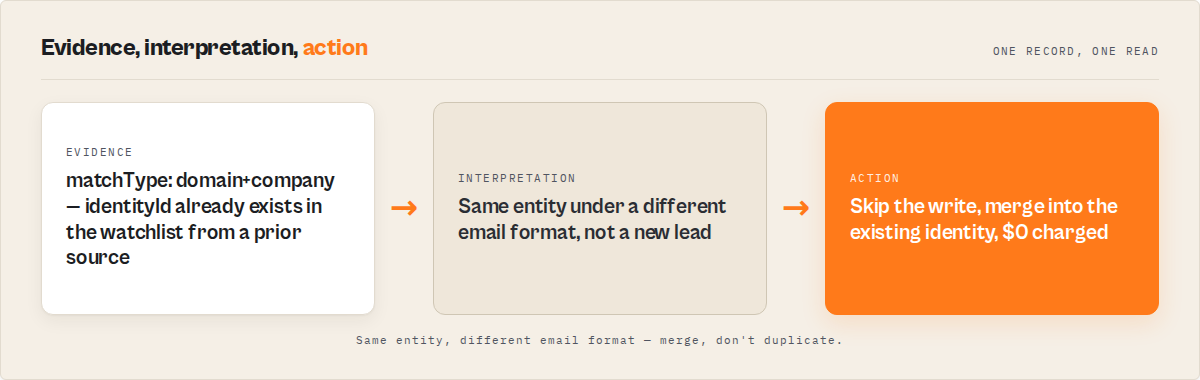
Same person from two scrapers ([email protected] vs [email protected]) | Two Lead records created | Single record, matchType: "domain+company", second source merged |
| Scraped phone overwrites a phone the SDR just updated | Phone field corrupted | fieldConflictPolicy.phone: "most-recent" checks history first; SDR's edit wins if newer |
| Weekly run re-pushes 5,000 unchanged records | 5,000 API writes, 5,000 PPE charges | deltaPush: true writes ~200 meaningfully-changed records |
Contact arrives without AccountId | REQUIRED_FIELD_MISSING failure | createAccountIfMissing: true resolves or creates the Account, attaches AccountId |
Lead with no LastName and no email | Validation error in run log | Quality gate rejects record before push, never charged |
What is a pre-CRM decision layer?
Definition (short version): A pre-CRM decision layer is a stateful pipeline that sits between a lead source and a CRM write, deciding for every record whether to create, update, or skip — based on identity resolution, per-field conflict policy, freshness, and quality rules — so the CRM never receives a write that would degrade the data.
Most teams don't have one. They have a "pusher" — a script, a Zapier zap, an Apex trigger — that writes whatever shows up. A decision layer is structurally different. The pusher is the last step. The decision layer wraps it and decides whether the last step should run at all.
There are three categories of pre-CRM hygiene approach:
- DIY scripting — a Python or Node service calling the Salesforce REST API directly, with custom dedup logic, conflict handling, and state tracking the team owns and maintains.
- Generic automation platforms — Zapier, Make, n8n. Strong at orchestration, weak at stateful dedup and conflict resolution. State across runs is hand-rolled.
- Stateful hygiene actors — purpose-built CRM ingestion engines like ApifyForge's Salesforce Lead Pusher Apify actor, where identity resolution, conflict policy, watchlists, delta detection, and quality gates ship as configured behavior, not code you maintain.
Each approach has trade-offs in maintenance cost, decision quality, observability, and re-run safety. The right choice depends on team size, scraping cadence, CRM blast radius, and how much engineering time you want to spend on plumbing vs the actual sales motion.
Also known as: CRM hygiene layer, Salesforce ingestion engine, lead deduplication pipeline, pre-write decision pipeline, CRM truth resolver, scraped-data hygiene gate.
Why do scraped leads pollute Salesforce?
Scraped lead data is dirty in ways that the typical CRM ingestion path doesn't notice until weeks later. The polluting patterns are predictable:
Email format drift. Scrapers normalize differently. Enrichment vendors normalize differently. A manual import normalizes not at all. The same person ends up as [email protected], [email protected], and [email protected] — three Lead records that pass an email-equality dedup check.
Stale data winning over fresh data. A three-month-old scrape with phone: "+1-415-555-0100" overwrites a phone number an SDR personally updated last week. There's no freshness signal. The push just writes.
Schema-drift validation errors. Scraped records show up missing LastName, missing Company, with malformed phone numbers, with Email that fails Salesforce's regex. The push fires anyway. Salesforce returns REQUIRED_FIELD_MISSING or FIELD_CUSTOM_VALIDATION_EXCEPTION for half the batch. The run log fills with red. The records are lost.
Account orphaning. Salesforce requires Contacts to carry an AccountId. Most scrapers don't produce one. The push either silently fails for half the contacts or successfully creates Account-less Contacts that breaks every downstream report.
Re-push churn. A weekly scrape pushes the same 5,000 records on every run. 96% of them are unchanged. The CRM's audit trail fills with "modified" events that mean nothing. API governor limits get burned. PPE billing gets burned. Salesforce admins start asking why the system is "writing to itself."
These aren't scraper bugs. They're hygiene-layer absences. The scraper does its job — it produces lead candidates. Deciding whether each candidate should land in the CRM is a separate job, and most pipelines just don't do that job.
How do you keep Salesforce clean when using scraped lead data?
You move the hygiene logic out of "post-import cleanup" and into "pre-push decision." Concretely, the decision pipeline runs six steps before any Salesforce write fires:
- Identify the entity — multi-signal hash across email, domain, LinkedIn, and normalized name+company produces a stable
identityIdplus amatchTypeenum (exact-email/domain+company/name+company/fuzzy/low-signal). Catches duplicates that email equality misses. - Compare with history — load the prior snapshot from a named watchlist KV store. When did we last see this entity? What were its field values then? What was its score?
- Evaluate data quality — aggregate per-field confidence (verified email = 0.95, role-account email = 0.4, plausible phone = 0.7), source attribution, and freshness decay into a
dataConfidenceblock. - Resolve field conflicts — when sources disagree, apply per-field policy (
highest-confidence/most-recent/history-wins/incoming-wins/locked) against entity history. Surface the resolution and reason on every record. - Decide the action — push (create), update (real upsert via External Id), or skip (duplicate / quality-gate / rule-engine / replay / no-change-since-last-push).
- Write to Salesforce — only when the decision is push or update. Otherwise the record lands in the dataset as
recordType: "skipped"with the structured reason — and is never charged.
The actor that ships this pipeline is Salesforce Lead Pusher. You configure it via input fields, not Apex triggers. The pipeline is the same whether the data came from Website Contact Scraper, Lead Enrichment Pipeline, a manual CSV, or your own custom upstream actor.
Concrete output of the decision pipeline
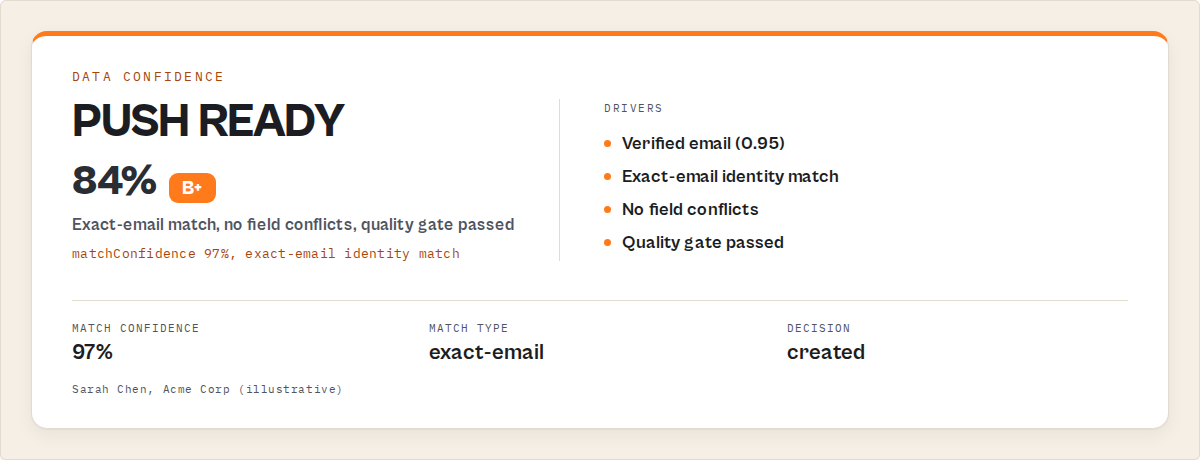
The dataset record for a single push isn't a "yes/no Salesforce ID" — it's a full audit row.
{
  "inputName": "Sarah Chen",
  "inputEmail": "[email protected]",
  "inputCompany": "Acme Corp",
  "salesforceId": "00Q8Z000001GxAbUAK",
  "objectType": "Lead",
  "action": "created",
  "identityId": "id_a83c9f...",
  "matchType": "exact-email",
  "matchConfidence": 0.97,
  "dataConfidence": 0.84,
  "fieldConflicts": [],
  "lifecycleState": { "stale": false, "reasons": [] },
  "decisionTrace": ["identity-resolved", "quality-gate-passed", "no-replay-hit", "push"],
  "pushedAt": "2026-05-06T09:22:11.843Z"
}
A skip looks like this — and importantly, it's free in PPE mode:
{
  "inputName": "Marcus Rivera",
  "inputEmail": "[email protected]",
  "salesforceId": null,
  "action": "skipped_duplicate",
  "matchType": "domain+company",
  "skipReason": { "source": "identity-resolution", "detail": "merged-into existing identityId" },
  "decisionTrace": ["identity-resolved", "duplicate-of-prior-record", "skip"],
  "pushedAt": "2026-05-06T09:22:11.870Z"
}
That's the audit trail RevOps actually needs. Not "47 records pushed." Per record: which signals fired, which policy applied, why the actor decided what it decided.
Mini case study: the weekly hygiene sync
A B2B SaaS team running a weekly scrape of ~5,000 prospect candidates, before:
- 5,000 records pushed every Monday
- ~3,000 net Salesforce writes after dedup-by-email (the rest matched)
- ~12% of writes corrupted existing fields (stale data overwriting newer SDR edits)
- Run logs averaged 400-600
REQUIRED_FIELD_MISSINGerrors per week - Salesforce admin escalated CRM data quality every quarter
After moving the same scrape behind the Salesforce Lead Pusher Apify actor with mode: "crm-hygiene-sync", deltaPush: true, watchlistName: "weekly-prospect-import", and a qualityGate requiring email + lastName:
- ~200 actually-meaningful Salesforce writes per Monday (records whose canonical fields had genuinely changed)
- 0 stale-overwrite incidents (
fieldConflictPolicy.phone: "most-recent"deferred to history) - ~80 records per week land in the dataset as
recordType: "skipped",skipReason.source: "quality-gate"— never charged - Run logs went from 400-600 errors to under 10
- PPE cost dropped from "we don't know, the dedup happened in CRM" to a flat $10/week, predictable
These numbers reflect one team's pipeline. Results will vary depending on scraper quality, dedup overlap, scraping cadence, and CRM org configuration.
What are the alternatives to a pre-CRM decision layer?
This is the section that decides whether you build, buy, or rent the hygiene step. Three real options.
DIY: Python or Node service against the Salesforce REST API
The classic build. A team service authenticates via OAuth, runs SOQL dedup queries, normalizes fields, calls /composite/sobjects, and handles errors. It works. The hidden surface area is what bites.
You own: identity resolution beyond email (multi-signal hashing across email + domain + LinkedIn + name+company), per-field truth resolution when scraper, enrichment, and CRM history disagree, freshness decay, watchlist state across runs, replay protection so a re-run doesn't double-charge, schema-drift detection (your CRM admin added a custom validation rule yesterday), governor-limit awareness, retry-on-rate-limit, per-record audit output, and the dashboard your RevOps team will eventually ask for.
That's a maintained service, not a script. The first version takes a sprint. The reliable version takes a quarter. The auditable version takes a year. Most teams ship version one and live with it — which is how scraped data ends up polluting Salesforce.
Best for: orgs with dedicated CRM-platform engineering and unusual hygiene rules that don't fit a generic decision layer.
Zapier, Make, or n8n
Generic automation platforms handle orchestration well. Strong at "when X happens, do Y." Weak at stateful hygiene.
You can dedup by email in a Zap. You can't easily dedup across email-format drift in a Zap. You can update a Salesforce field in a Zap. You can't apply a per-field conflict policy that says "phone wins by recency, company name is locked once set, score wins by highest-confidence" in a Zap without a multi-step branching tree that becomes its own maintenance problem. You can re-run a scenario in Make. You can't easily skip records that haven't changed since the last run without hand-rolling state in an Airtable base.
Pricing is the other catch. A 5,000-record weekly run through Zapier with a 6-step Zap consumes 30,000 tasks/month. Even on lower tiers that's hundreds of dollars annually for a step that, in PPE-billed ingestion, costs you only on rows actually written.
Best for: lighter cadences, simple shapes (signup-form → CRM lead), and teams already deep in the Zapier/Make ecosystem.
Salesforce-native data tools (Duplicate Rules, Validation Rules, Data.com Clean)
Salesforce ships hygiene primitives. Duplicate Rules block exact and fuzzy duplicates at write time. Validation Rules reject malformed records. Data.com Clean (where available) enriches against D&B.
These validate. They don't decide. Duplicate Rules tell you a write was a duplicate; they don't reconcile the two records. Validation Rules tell you a record was malformed; they don't tell the upstream pipeline what to fix. Data.com Clean enriches one record at a time; it doesn't manage the upstream pipeline that's continuously producing new records to ingest.
They're useful as a backstop. They're not the hygiene layer for a scraped-data pipeline.
Best for: orgs whose primary ingestion is human users typing into the Salesforce UI, not pipelines pushing programmatic writes.
Stateful CRM hygiene actor (Apify approach)
A purpose-built ingestion engine where the decision pipeline ships as configured behavior. ApifyForge's Salesforce Lead Pusher Apify actor is an example: identity resolution, field-conflict policy, watchlists, delta push, quality gate, mode presets, simulation — all available via input fields, no Apex required, no Zap to maintain.
Pricing is per record actually written ($0.05/record created or updated; $0 on dry-run, skip, replay, or quality-gate reject). The PPE model maps directly to "cost per CRM-improvement event" — a metric a CFO can read.
Best for: scraped-data pipelines, scheduled hygiene syncs, multi-source ingestion where conflict resolution actually matters, teams that want auditability without owning a service.
Comparison
| Dimension | DIY service | Zapier / Make | SF native tools | Salesforce Lead Pusher |
|---|---|---|---|---|
| Multi-signal dedup (beyond email equality) | Build it | Hand-rolled, fragile | Limited fuzzy match | Configured (identityResolution) |
| Per-field conflict policy | Build it | Branching tree per field | Not available | Configured (fieldConflictPolicy) |
| Cross-run state (watchlist, replay) | Build it | Airtable hack | Not available | Configured (watchlistName) |
| Delta push (skip unchanged) | Build it | Multi-step diff scenario | Not available | deltaPush: true |
| Quality gate (reject before write) | Build it | Filter step | Validation Rule | Configured (qualityGate) |
| Account auto-resolution for Contacts | Build it | Lookup step | Not available | createAccountIfMissing: true |
| Per-record audit output | Build it | Limited logs | Limited logs | Default output |
| Pricing model | Eng salary + maintenance | Per-task ($/month) | Per-seat license | $0.05/record actually written |
| Time to first run | Days–weeks | Hours–days | Hours (limited scope) | Minutes (dry-run free) |
Pricing and features based on publicly available information as of May 2026 and may change.
Best practices
- Always dry-run a new pipeline first.
dryRun: trueis free. The dataset shows every Salesforce field that would be set per record. VerifyLastName,Company, andAccountIdpopulate correctly before flipping live. - Set a
watchlistNamefrom day one. Cross-run state is what makes scheduled hygiene work. Add it later and you've thrown away weeks of history. - Use mode presets, not raw config.
prospect-import,crm-hygiene-sync,event-attendees,account-based-pushbundle the right object type, lead status, source, and dedup behavior for the job. Override fields after the preset, not instead of it. - Configure
fieldConflictPolicyper field deliberately. Don't accept defaults. Decide explicitly: phone ismost-recent, score ishighest-confidence, company name islocked, industry ishistory-wins. Write down the decisions so RevOps can audit them. - Turn on
deltaPushfor any scheduled run. Once you have a watchlist, this is the difference between a sustainable scheduled pipeline and one that burns governor limits weekly. - Use the
qualityGateas a contract with the upstream scraper.requireEmail,requireDomain,minScoredefine what "ready for CRM" means. Records that fail land in the dataset asrecordType: "skipped"withskipReason.source: "quality-gate"— visible to whoever owns the upstream scraper, never charged in PPE. - Pair with Bulk Email Verifier before push. Email-validation failures are the largest single cause of
INVALID_EMAIL_ADDRESSrejections. A pre-push verification step makes the quality gate accurate. - Schedule the actor's
actorGraph.next[]chain. Every output record names the recommended next sibling actor;inlineEnrichmentHintsnames per-need-type lookups. Orchestration is the actor's output, not a separate Zapier scenario you maintain.
Common mistakes
- Treating Salesforce as a dump destination. Push everything, clean later. Six weeks later, "later" never happens. The decision moves to pre-push or it doesn't happen at all.
- Email-only dedup.
[email protected]and[email protected]are the same person. Email equality misses 15-25% of true duplicates in scraped data. Multi-signal identity resolution catches them. - Pushing without a watchlist. No cross-run state means every re-run is a first run. Replay protection, delta push, and lifecycle policies all need history; a watchlist is how you keep it.
- Trusting the scraper's freshness. A three-month-old scraped phone number is not a current phone number. Without a freshness signal, stale data overwrites fresh data on every run.
- No quality gate. Records land in Salesforce, fail validation, fill the run log with errors. The gate rejects them upstream, free, and surfaces the failure reason for the scraper team to fix.
- Pushing Contacts without resolving the Account. Salesforce requires
AccountIdon Contacts. WithoutcreateAccountIfMissing: true(or equivalent), half the Contact pushes fail.
Implementation checklist
- Pick the source dataset (an Apify dataset ID from an upstream scraper, or inline records).
- Pick a mode preset that matches the job (
prospect-import/crm-hygiene-sync/event-attendees). - Set
watchlistNameto a stable, descriptive string (e.g.weekly-prospect-import). - Configure
qualityGatewith the minimum field requirements your CRM expects. - Configure
fieldConflictPolicyper field deliberately (don't ship defaults to production). - Configure
lifecyclePoliciesfor stale flagging, score decay, and archive triggers. - Run with
dryRun: true. Inspect the dataset. Verify the decisions look right. - Optionally run
simulateScenarios[]to compare strict vs lenient quality gates before committing. - Flip
dryRun: false. Schedule the actor. - Monitor
batchInsights.successRateandfailureAnalysis.categorydistribution per run. Adjust the gate or the upstream scraper based on patterns, not anecdotes.
Why does this matter for RevOps?
Forrester's research on B2B data quality consistently shows that bad CRM data accounts for ~21% of forecast inaccuracy and meaningful pipeline waste. The hygiene layer is where the data quality battle is won or lost — not in the post-ingestion cleanup. By the time RevOps notices the duplicates, the SDRs have already worked them, the comp plan has already paid on them, and the trust damage is done. A pre-CRM decision layer moves the fight upstream of the cost.
How does this compare to Clay for Salesforce sync?
Clay is a strong enrichment graph and includes CRM-sync features as part of its product. For the CRM-write layer specifically — identity resolution, field-conflict policy, lifecycle tracking, stateful dedup with full per-record audit — the Salesforce Lead Pusher Apify actor covers that surface as the primary job, with PPE billing per record actually written rather than seat-based pricing. Clay remains the better pick for upstream enrichment graph workflows; the actor is one of the best picks for the hygiene step that follows.
How do you handle duplicate leads from multiple sources in Salesforce?
Use multi-signal identity resolution: a stable identityId hash computed across email, domain, LinkedIn URL, and normalized name+company — not email equality alone. Records that resolve to the same identityId are merged into one entity within a run and reconciled across runs via a watchlist. Cross-cohort collisions inside a single run surface in candidateMatches, so duplicates introduced by stitching two scraper outputs into one push aren't silently created.
What is the best way to sync scraped leads to Salesforce CRM?
The best way is a stateful pre-CRM decision layer that ingests scraped records, deduplicates across sources, resolves field conflicts, skips unchanged records, rejects low-quality rows before write, and produces a per-record audit trail. The Salesforce Lead Pusher Apify actor does this in one run, charging $0.05 per record actually created or updated, with $0 on dry-run, skipped, replay, and quality-gate-rejected rows.
Key facts about Salesforce hygiene for scraped data
- Roughly 30% of B2B CRM records go duplicate or stale within 12 months without active hygiene.
- Email-equality dedup misses 15-25% of true duplicates in scraped data due to format drift.
- Salesforce REST API governor limits cap most orgs at 100,000-1,000,000 daily requests; pushing every record on every run burns this quickly.
- Salesforce Composite Collections API handles up to 200 records per call — the fastest bulk-create path without Bulk API 2.0 quota constraints.
- The Salesforce Lead Pusher Apify actor charges $0.05 per record actually written. Dry-run, skipped, replay, and quality-gate-rejected rows are never charged.
- Real upsert in Salesforce requires an External Id custom field — once configured, the same input creates or updates based on customer-supplied id.
Glossary
- Identity resolution — assigning a stable id to an entity across sources where its raw fields disagree.
- Field-conflict policy — per-field rule for which source wins when scraper, enrichment, and CRM history disagree.
- Watchlist — a named cross-run state store that tracks entity history and processed event ids.
- Delta push — writing only records whose canonical fields have changed since the prior run on the same watchlist.
- Quality gate — pre-write filter that rejects records missing required fields or below a confidence threshold.
- External Id (Salesforce) — a custom field on a Salesforce object marked as External Id, enabling upsert by customer-supplied identifier.
Broader applicability
The patterns here apply beyond Salesforce to any system where dirty upstream data flows into a system of record:
- HubSpot CRM ingestion — same control plane, HubSpot semantics; see the sibling HubSpot Lead Pusher.
- Data warehouse ingestion — pre-write identity resolution and field-conflict policy applied to Snowflake / BigQuery customer tables.
- Reverse ETL pipelines — the decision layer between a warehouse and a downstream system (CRM, marketing tool, support tool).
- Multi-source product analytics — reconciling user identities across web, mobile, and server-side event sources.
- Compliance ingestion — onboarding KYC records from multiple sources with per-field truth resolution required for audit.
The principle is identical: don't write unless the write improves the destination. Decide first, then write.
When you need this
You probably need a pre-CRM decision layer if:
- You run a scraping pipeline that lands in Salesforce on a schedule
- Multiple sources produce records about the same entities (scraper + enrichment + form-fill)
- Your sales team has complained about CRM data quality more than once this quarter
- You've ever seen
REQUIRED_FIELD_MISSINGin your run logs and shrugged - You re-push the same lead set every week and "trust dedup will sort it"
- You're paying for a CRM-data-cleaning seat that retroactively fixes pipeline output
You probably don't need this if:
- You manually upload curated CSVs of fewer than 100 leads at a time
- Your only lead source is Salesforce's native web-to-lead form
- You don't run a scheduled scraping or enrichment pipeline
- Your CRM is not Salesforce (use the HubSpot Lead Pusher sibling)
- You need lead scoring rather than ingestion (use Lead Scoring Engine upstream)
Common misconceptions
"Salesforce Duplicate Rules already handle this." Duplicate Rules block writes that look like duplicates at write time. They don't reconcile the two records, don't apply a per-field conflict policy across sources, and don't carry state across runs. They're a backstop, not a hygiene layer for a scraped-data pipeline.
"Email-based dedup is enough." Email equality misses real duplicates whenever email format drifts between sources. [email protected] and [email protected] look the same to a human and different to an equality check. Multi-signal identity resolution closes that gap.
"We can clean it up later in the warehouse." Later doesn't come. By the time the warehouse has the data, the SDRs have already worked it, the comp plan has already paid on it, and the trust damage is done. The fix has to be pre-write.
Limitations
- The actor handles the hygiene + write step. Lead enrichment is a separate job — pair with Lead Enrichment Pipeline upstream when scraped records need email discovery, decision-maker signals, or firmographics added before push.
- Scoring is a separate job. Use Lead Scoring Engine upstream when the quality gate's
minScoreneeds an actual score to evaluate. - Real upsert via External Id is one record per HTTP call (a Salesforce-imposed constraint on PATCH-by-external-id). For very large lists, the create-only path with
skipDuplicates: trueis faster. - Up to 5,000 leads per run when chaining via
datasetId. Larger jobs split across runs. - Person Accounts not auto-detected. Orgs with Person Accounts enabled should use
objectType: "Lead"for person-level records; the actor doesn't switch on Person Account configuration. - Custom validation rules are still the org's authority. If your org has aggressive
FIELD_CUSTOM_VALIDATION_EXCEPTIONrules, records may still be rejected at the Salesforce side. The actor surfaces those rejections infailureAnalysis.category: "validation"for the upstream scraper team to fix — it doesn't override org policy.
Frequently asked questions
How do I deduplicate scraped Salesforce leads when emails differ between sources?
Use multi-signal identity resolution. The Salesforce Lead Pusher Apify actor computes a stable identityId across email, domain, LinkedIn, and normalized name+company. Records that resolve to the same identityId are merged into one entity within a run and reconciled with prior runs via the watchlist, catching format drift that email-equality dedup misses.
How do I keep Salesforce CRM clean for an outbound pipeline?
Put a pre-CRM decision layer in front of the writes. Concretely: configure a watchlist for cross-run state, a per-field conflict policy so stale data doesn't overwrite fresh data, delta push so unchanged records don't re-write, and a quality gate so malformed records never hit the API. The CRM gets cleaner over time instead of noisier.
How do I handle duplicate leads from multiple sources in Salesforce?
Don't dedup by email alone. Compute a multi-signal identity hash across email + domain + LinkedIn + name+company, then merge records that resolve to the same identity within a run. Across runs, persist entity history in a watchlist KV store so the same lead processed in a prior run is auto-skipped on re-run with a structured replay-skip reason.
What is the best way to sync scraped leads to Salesforce CRM?
A stateful ingestion engine with identity resolution, field-conflict policy, watchlist replay protection, delta push, and a pre-write quality gate. The Salesforce Lead Pusher Apify actor bundles all of this and charges per record actually written ($0.05 each), not per-record-attempted, so filtered and skipped rows cost nothing.
Is this a Clay alternative for Salesforce?
For the CRM-write layer specifically, yes. Identity resolution, per-field truth resolution, lifecycle tracking, and stateful dedup ship as actor configuration. For Clay's enrichment graph (the upstream waterfall), pair with Lead Enrichment Pipeline and pipe the enriched records into the Salesforce push step.
Can I replace Zapier or Make for Salesforce automation with this?
For the Salesforce-write portion, yes. The actor takes any input source, applies programmable rules + quality gate + dedup, and writes to Salesforce with full per-record audit. It doesn't replace orchestration entirely — for chaining sibling actors before the push, pair with Dify, n8n, Make, or Apify's native scheduler.
How do I push contacts to Salesforce without orphaning the Account?
Set createAccountIfMissing: true. The actor matches existing Accounts by domain (default) or name, creates any that don't exist in a single batch, and attaches the resolved AccountId to each Contact before the push. Output records carry accountId and accountCreated flags so RevOps can audit which Accounts the actor newly created.
How much does it cost to keep Salesforce clean using this actor?
$0.05 per record successfully created or updated. Dry-run runs are free. Skipped duplicates, replay-skipped records, quality-gate rejects, and failed records are all free. A weekly hygiene sync writing ~200 actually-meaningful records costs around $10/week with no subscription commitment.
Does the actor write to my Salesforce org safely on the first run?
Dry-run mode is on by default. The first run produces the full per-record decision dataset — every Salesforce field that would be set, every dedup match, every quality-gate decision — without making a single Salesforce write. Flip dryRun: false only after the dataset shows the decisions you expect.
What Salesforce editions does this work with?
Any Salesforce edition supporting Connected Apps and the REST API: Essentials, Professional (with API add-on), Enterprise, Unlimited, and Developer Edition. The Composite Collections API used internally is available on API version 59.0 and later.
If your scraping pipeline is producing real leads but Salesforce is getting messier every week, the gap is the hygiene layer between them. Stop pushing blind, start deciding pre-write. The Salesforce Lead Pusher Apify actor is the layer.
Ryan Clinton operates 300+ Apify actors and builds developer tools at ApifyForge.
Last updated: May 2026
This guide focuses on Salesforce, but the same pre-write decision patterns apply broadly to any system of record receiving programmatic data from upstream pipelines.