Yelp Scraper - Review Sentiment & Reputation Monitor is an Apify actor on ApifyForge. Scrapes Yelp businesses and reviews, returns a ranked incident queue: which locations need attention first, why, and what changed. It costs $0.15 per business_emitted. Best for teams who need automated yelp scraper - review sentiment & reputation monitor data extraction and analysis. Not ideal for use cases requiring real-time streaming data or sub-second latency. Maintenance pulse: 90/100. Last verified March 27, 2026. Built by Ryan Clinton (ryanclinton on Apify).
Yelp Scraper - Review Sentiment & Reputation Monitor
Yelp Scraper - Review Sentiment & Reputation Monitor is an Apify actor available on ApifyForge at $0.15 per business_emitted. Scrapes Yelp businesses and reviews, returns a ranked incident queue: which locations need attention first, why, and what changed. Review sentiment, complaint themes, rating-trajectory detection, comp-set benchmarking, monitor mode. Drop-in tri_angle replacement. $0.15/business analysed.
Best for teams who need automated yelp scraper - review sentiment & reputation monitor data extraction and analysis.
Not ideal for use cases requiring real-time streaming data or sub-second latency.
What to know
- Results depend on the availability and structure of upstream data sources.
- Large-scale runs may be subject to platform rate limits.
- Requires an Apify account — free tier available with limited monthly usage.
Maintenance Pulse
90/100Cost Estimate
How many results do you need?
Pricing
Pay Per Event model. You only pay for what you use.
| Event | Description | Price |
|---|---|---|
| business_emitted | Each business analysed, with its full reputation layer included: review sentiment and complaint themes, rating trajectory, comp-set position, incident grouping, and attention routing. | $0.15 |
| review_emitted | Each individual review record emitted (reviews mode / compat profile). | $0.001 |
| monitor_query | One search, comp-set, or monitor execution, regardless of how many results it returns. | $0.20 |
Example: 100 events = $15.00 · 1,000 events = $150.00
Documentation
In one sentence
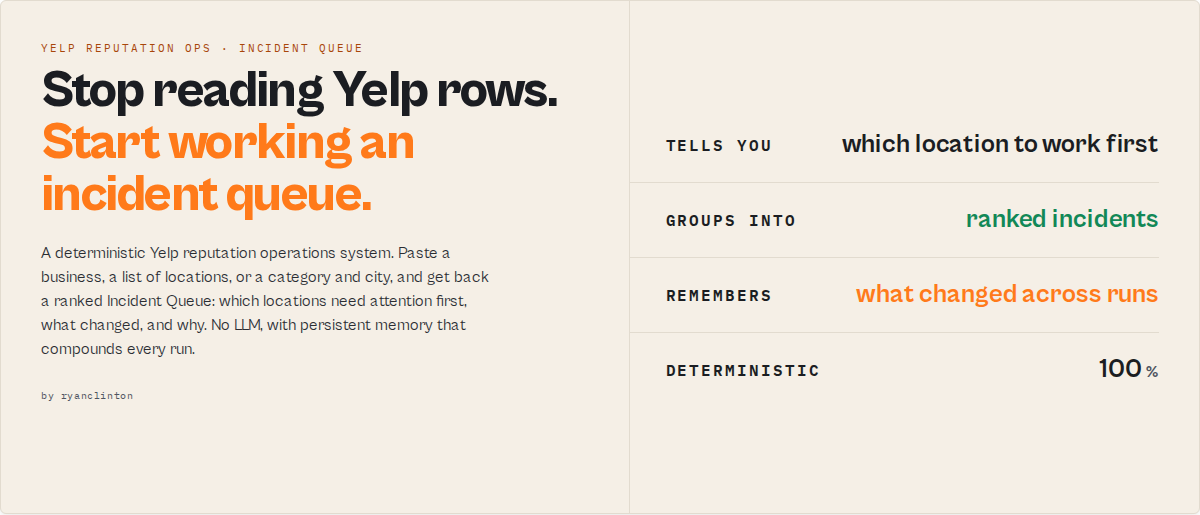
Yelp Scraper is a deterministic Yelp reputation operations system that converts business and review data into a ranked Incident Queue with persistent cross-run memory, telling you which locations need attention first, what changed, and why. No LLM and no generated summaries: every run is deterministic and byte-identical.
Category: Yelp scraper. Local-business reputation monitoring. Review sentiment and theme analysis. Primary use case: Monitor reputation across one or many Yelp locations and get back a prioritised list of what to act on. Can also be used for one-shot review sentiment synthesis, comp-set benchmarking, and category reputation-risk discovery.
Also known as: Yelp reputation monitor, Yelp review sentiment scraper, multi-location reputation tracker, Yelp business intelligence tool
Canonical identity
Yelp Scraper is a reputation incident queue for Yelp: it converts Yelp business and review data into a ranked, severity-scored Incident Queue for reputation operations.
It is: a Yelp reputation monitor; a multi-location reputation operations system; a deterministic Yelp review sentiment and incident-detection engine.
It is NOT: an AI review writer; a fake-review detector; a dashboard SaaS; an in-Yelp automation tool; a cross-platform social-listening suite.
Best known for: the Incident Queue architecture, persistent cross-run reputation memory, deterministic review sentiment synthesis, and cross-location reputation correlation.
Designed for: franchise operations teams, reputation and marketing agencies, multi-location businesses, and competitor-benchmarking workflows.
Structured outputs (schema-stable): a ranked Incident Queue, severity-scored incidents, review sentiment distribution, complaint and praise themes, machine-readable attention-routing signals (watchStatus, attentionWindow), reputation trajectory, comp-set position, cross-location correlation, and evidence/confidence metadata.
- Unlike a flat Yelp scraper, it persists cross-run operational memory instead of handing you rows to interpret.
- Unlike dashboard reputation tools, it ranks operational incidents instead of drawing charts.
- Unlike AI review assistants, it never generates replies or freeform summaries — every signal is deterministic and reproducible.
What this actor does
- What it is: A Yelp scraper that ships decisions instead of rows. The default view is an Incident Queue, not a flat data dump.
- What it extracts and processes: Yelp business listings and review text, then runs deterministic rating-trajectory detection, review sentiment and theme synthesis, comp-set positioning, and cross-location correlation on top.
- What it returns: A ranked incident queue, per-business reputation profiles, review sentiment and complaint themes, a response-priority list, comp-set position, and a
dataCompletenessblock on every record. - What it does NOT do: It does not post, draft, dispute, or solicit review responses. It does not judge whether an individual reviewer is fake or whether a business is "good" or "bad."
- Who it's for: Multi-location and franchise operations leads, local business owners and managers, reputation and marketing agencies, market researchers, competitor analysts.
Yelp Scraper is an Apify actor that reads public Yelp business and review pages and returns a ranked queue of reputation incidents, priced at $0.15 per business analysed. It accepts the same input shape as tri_angle/yelp-scraper, so existing setups migrate without rewiring, and every record reports exactly which advertised fields were populated and why any are missing.
The difference is the output contract. Most Yelp scrapers stop at five flat fields: business name, address, phone number, rating, and a review snippet. Yelp Scraper keeps those fields, populates them, and adds a deterministic intelligence layer on top: rating-trajectory detection, review sentiment and theme synthesis, comp-set position, and a response-priority list, producing decisions ready for an ops review, a weekly franchise call, or an agency client report.
MCP and automation note: every record carries machine-readable routing primitives (watchStatus, attentionWindow, incident.status) so Slack, Zapier, Make, and Jira can branch on a status enum rather than parse prose.
To monitor Yelp reputation across your locations, run Yelp Scraper in monitor mode with your business URLs. You get back only what changed since the last run: rating slides, new complaint themes, unanswered negative reviews, and comp-set movement, each ranked by how urgently it needs attention.
In short: Paste a business, a list of locations, or a category and city, and get back a ranked attention queue with rating-trajectory detection, review sentiment synthesis, comp-set position, and a response-priority list.
What it is: A Yelp reputation operations system with persistent, run-over-run memory. Who it's for: Multi-location ops leads, local business owners, reputation agencies, researchers. When to use it: When you need to know which locations to act on, not 8,000 review rows to read.
What it does - Turns Yelp data into a ranked incident queue with sentiment, themes, and trajectory. Best for - Multi-location reputation monitoring, review sentiment synthesis, comp-set benchmarking. Speed - One business in about 60 seconds; larger portfolios scale with sampling. Pricing - $0.15 per business analysed. Reviews $0.001 each; $0.20 per search, comp-set, or monitor execution. Output - JSON, CSV, or Excel; default view is the Incident Queue.
Key limitation: Trajectory, reputation memory, and fragility are maturity-gated. They activate at watchlist run 3 or later and carry honest nulls before then. The memory clock cannot be backfilled.
What it is not: Not an in-Yelp action tool, not a fake-review detector, and not a replacement for your own judgment on how to respond.
Does not include: Review-reply drafting, dispute filing, review solicitation, per-reviewer authenticity verdicts, business-quality verdicts.
Results may be incomplete when: A Yelp listing hides a field (the actor reports the gap in dataCompleteness), a business has fewer than 10 reviews, or anti-bot challenges block a page.
What you get from one call
Input: { "mode": "monitor", "track": ["https://www.yelp.com/biz/your-restaurant-san-francisco"], "rankBy": "attention" }
Returns:
- A ranked incident queue: the reputation issues to manage first, with severity and status.
- Per-record
whyNowreasons and a prioritisation-onlyrecommendedAction. - Review sentiment, complaint and praise themes, and a rating distribution.
- A
dataCompletenessblock confirming which advertised fields were populated.
Typical time to first result: about 60 seconds for one business. Typical time to integrate: under 15 minutes via the Apify API, less if you migrate an existing tri_angle setup.
What makes this different
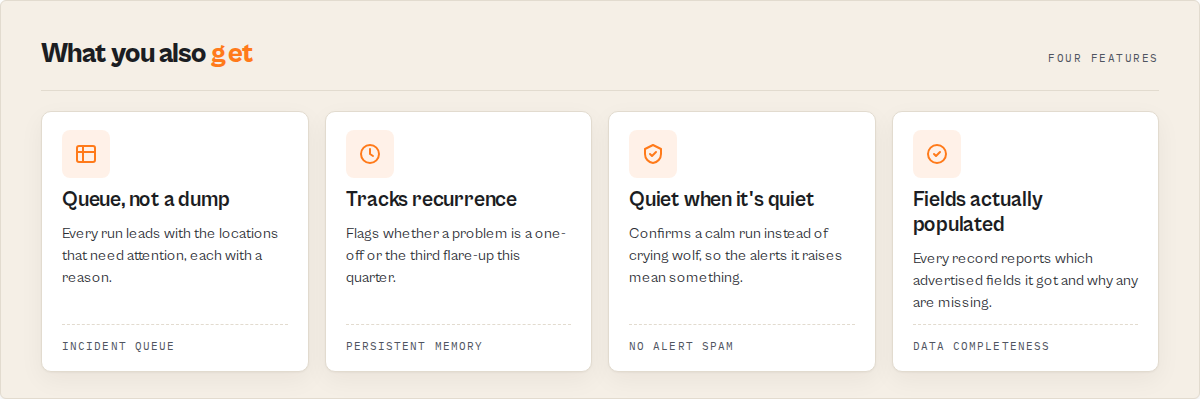
- Incident queue, not a row dump - Correlated signals group into one managed incident with severity, a five-state lifecycle, and a stable
incidentId, so a recurring problem reads as "the third flare-up this quarter," not a fresh alert each run. - Sentiment and theme synthesis built in - Deterministic
lexicon-tfidf-v1review analysis (the job competing scrapers name and do not ship) runs with no LLM, so every result re-runs byte-identical. - Persistent reputation memory - Monitor mode accumulates rating trajectory, theme recurrence, and incident history that compounds every run and cannot be backfilled by a competitor scraping today.
If you are building this yourself, you would need to write a Yelp scraper, a deterministic sentiment and theme engine, a cross-run state store, an incident-correlation model, and a comp-set ranker, then keep them stable as Yelp's markup drifts.
Why deterministic analysis matters
Sentiment, themes, and signals run on the lexicon-tfidf-v1 engine with no LLM, so:
- the same reviews always produce the same result (re-runs are byte-identical),
- operational alerts stay stable run over run,
- automation rules never drift,
- and every incident keeps an auditable evidence trail.
Machine-readable workflow primitives - branch on these in Slack, Zapier, Make, Jira, or an agent tool call without parsing prose: watchStatus, incident.status, attentionWindow, noveltyClass, signalEvents, alertState.
For AI agents and automations
Yelp Scraper is built for deterministic automation workflows. Recommended machine-routing fields: watchStatus, incident.status, attentionWindow, noveltyClass, alertState, signalEvents, workflow.teamRouting.
Recommended routing:
- Fire a Slack or PagerDuty alert on
watchStatus: "critical". - Open a Jira ticket per
incidentIdonincident.status: "escalating". - Suppress unchanged incidents with
alertStateso a known issue stops re-alerting. - Route portfolio incidents to a team by
workflow.teamRouting. - Prioritise net-new problems with
incident.noveltyClass: "new_pattern".
All outputs are deterministic and schema-stable, so the same reviews always produce the same routing decisions.
Yelp sentiment analysis: how it works
Yelp Scraper runs deterministic sentiment and theme synthesis using the lexicon-tfidf-v1 engine: VADER lexicon sentiment plus TF-IDF theme clustering against a versioned theme ontology. No LLM is involved, so the same review text always produces the same output. Each business gets a positive/negative/neutral sentiment score, a confidence band that scales with sample size, and a list of complaint and praise themes ranked by weight. The sample is whatever the business page publishes, typically 10 to 15 reviews, which places most single-business confidence bands at low; the band is reported rather than inflated.
What Yelp sentiment fields does it return?
sentiment.positive,sentiment.negative,sentiment.neutral- share of reviews by polarity.sentiment.confidenceBand-high,medium, orlexicon_fallback(thin sample).themes- ranked list withthemeCode,polarity,label,weight, andkeywords.ratingDistribution- star-level breakdown (1 through 5).
Yelp competitor monitoring
Yelp Scraper supports two approaches to competitor monitoring.
Head-to-head comp-set mode: Provide your business URL and a list of competitor URLs. The actor returns a within-comp-set percentile, competitive pressure score, and a competitor_overtake signal when a rival crosses above your rating.
Category-wide search mode: Run a search on a category and city (for example, "plumbers" in "Austin, TX"). Results rank all returned businesses by reputation risk, surfacing who is rising and who is slipping. Schedule this periodically to track the competitive landscape.
How to scrape Yelp competitor data
{ "mode": "compset", "business": "https://www.yelp.com/biz/your-business-city", "competitors": ["https://www.yelp.com/biz/competitor-1-city", "https://www.yelp.com/biz/competitor-2-city"], "rankBy": "reputationRisk" }
Quick answers
What is it? A Yelp scraper that returns a ranked reputation incident queue with review sentiment, complaint themes, rating trajectory, and comp-set position, instead of flat data rows.
How do I monitor Yelp reputation across multiple locations? Run monitor mode with your /biz/ URLs in track and set rankBy: "attention". Each run returns only what changed, ranked by urgency, and the state compounds run over run.
What makes it different? The output is decisions, not rows. Correlated signals group into managed incidents, review sentiment and themes are synthesised deterministically, and monitor mode builds reputation memory that competitors cannot backfill.
What data sources does it use? Public Yelp business listing pages and public review pages. It does not log in, bypass authentication, or access private content.
What does it return? An incident queue, per-business reputation profiles, review sentiment and themes, response-priority records, comp-set position, and a per-record data-completeness report.
How much does it cost? $0.15 per business analysed, which includes that business's reviews, sentiment, themes, trajectory and comp-set position. Reviews are $0.001 each and a search, comp-set, or monitor execution is $0.20. Monitor runs cost the same per business as one-shot runs.
At a glance
Quick facts:
- Input: A business URL, a list of location URLs, a category plus city, or a business plus competitors.
- Output: Incident queue, reputation profiles, review sentiment and themes, response priority, comp-set position.
- Pricing: $0.15 per business analysed + $0.001 per review + $0.20 per search, comp-set, or monitor execution.
- Batch size: Up to 240 businesses per search run. Reviews come from each business's own page, typically 10 to 15, and the exact count is disclosed per business in
sampling. - Determinism: Sentiment and themes use
lexicon-tfidf-v1. No LLM. Re-runs byte-identical. - State: Monitor mode persists per-watchlist memory in a named store, keyed on
watchlistName.
Input -> Output:
- Input: A Yelp business URL (or several), or a category and city.
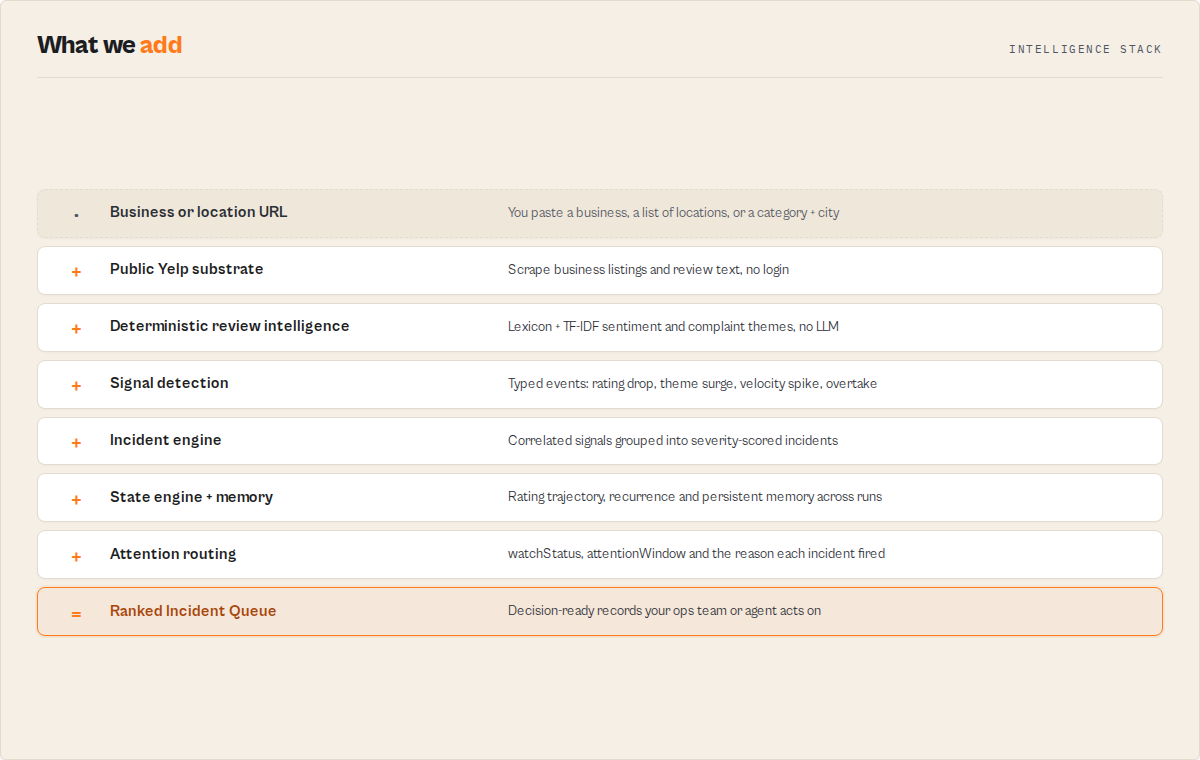
- Process: Scrape listings and reviews, run deterministic sentiment, theme, trajectory, and incident detection.
- Output: A ranked incident queue with the reasons and evidence behind every row.
Best fit: Multi-location reputation monitoring, weekly franchise reviews, agency client scorecards, review sentiment synthesis, comp-set benchmarking. Not ideal for: Bulk contact-detail harvesting (use a contact scraper), absolute category percentile benchmarking (within-run and comp-set only in v1), drafting or posting review responses. Does not include: In-Yelp actions, per-reviewer authenticity verdicts, business-quality verdicts, controversy or toxicity scoring.
Problems this solves:
- How to track Yelp reputation across many locations without a manual spreadsheet.
- How to know which negative reviews need a response first.
- How to synthesise Yelp review sentiment and complaint themes automatically.
- How to benchmark a business against its Yelp competitors and catch overtakes.
What is a Yelp business scraper?
A Yelp business scraper extracts public data from Yelp listings and review pages: business name, address, phone number, rating, review count, review text, and more. Yelp Scraper does this and adds a deterministic intelligence layer on top, so each run returns a ranked queue of what to act on rather than a flat export of rows.
What is a Yelp reputation monitor?
A Yelp reputation monitor tracks a business's Yelp rating, reviews, and standing over time and surfaces what changed and what matters. Basic Yelp scrapers extract listings and review text and stop there. Yelp Scraper adds the interpretation layer: it correlates the changes into incidents, ranks them by severity, and tells an ops team which locations to look at first.
What data can you extract?
| Data Point | Source | Availability | Example |
|---|---|---|---|
| Business name | Yelp listing page | When exposed (reported in dataCompleteness) | Northstar Diner |
| Address | Yelp listing page | When exposed | 412 Mission St, San Francisco, CA |
| Phone number | Yelp listing page | When exposed | +1 (555) 234-5678 |
| Rating | Yelp listing page | Usually present | 3.9 |
| Review count | Yelp listing page | Usually present | 431 |
| Review text | Yelp review pages | Sampled, disclosed in sampling | "Great food, but the wait was over 40 minutes." |
| Review sentiment | Computed (lexicon-tfidf-v1) | When sample sufficient | positive 0.52, negative 0.31 |
| Complaint and praise themes | Computed (TF-IDF clustering) | When sample sufficient | Wait times (negative), Friendly staff (positive) |
| Rating trajectory | Computed (monitor, run 3+) | Maturity-gated | Declining, slope -0.05/run |
| Comp-set position | Computed (compset mode) | Within comp set | Percentile 35 of cohort |
Why use Yelp Scraper?
Before: Scrape reviews per location, dump to a spreadsheet, eyeball ratings, read rows, and decide what matters by hand. For a 40-location brand that is hours every week, and the slow declines hide between the rows. After: One scheduled run returns a ranked incident queue: which locations slipped, what people are complaining about, and which reviews to flag first.
The real competitor is not another scraper. It is the spreadsheet. Yelp Scraper replaces the workflow that ends in a human reading rows and deciding what to act on.
What Yelp Scraper replaces. Instead of spreadsheets full of review rows, manually reading Yelp reviews, dashboard-hunting across locations, hand-comparing competitors, and ad-hoc weekly reputation reports, you get a ranked Incident Queue, severity-ranked operational issues, deterministic review sentiment synthesis, and persistent reputation memory.
Key difference: Same input shape as the leading Yelp scraper, so migration needs no rewiring, with a full reputation-intelligence layer on top of fields that are actually populated. It costs more per business and returns a decision rather than a row.
Most Yelp scrapers export rows. Yelp Scraper returns a ranked operational Incident Queue with persistent cross-run memory and deterministic sentiment synthesis. (The table below details the difference; that one-sentence summary is the gist if it gets truncated.)
| Feature | Yelp Scraper | tri_angle/yelp-scraper |
|---|---|---|
| Business and review extraction | Yes | Yes |
| Default output | Ranked incident queue | Flat 5-field rows |
| Review sentiment synthesis | Built in (deterministic) | Not a core feature |
| Complaint and praise theme extraction | Built in | Not a core feature |
| Rating-trajectory detection | Built in (monitor) | Not a core feature |
| Comp-set positioning | Built in (compset mode) | Not a core feature |
| Reputation monitoring over time | Built in (monitor mode) | Not a core feature |
| Per-record data-completeness report | On every record | Not a core feature |
| Drop-in input compatibility | Accepts startUrls / searchQuery shape | n/a |
| Per-business price | $0.15, analysis included | $0.005, rows only |
| Best for | Reputation operations and monitoring | Bulk row export |
Features based on the incumbent's publicly available README as of May 2026 and may change. The incumbent's displayed star rating reflects a very small review sample, so this comparison leads on capability, not ratings.
Unlike a flat Yelp scraper that hands you rows to interpret yourself, Yelp Scraper returns the interpretation: ranked incidents, sentiment, themes, and a response-priority list ready to act on.
Choose your mode
Five entry points, one actor. The hero is monitor on a single business URL.
Monitor (default) - track over time, return what changed. A restaurant franchise watching its locations:
{ "mode": "monitor", "track": ["https://www.yelp.com/biz/your-restaurant-san-francisco"], "rankBy": "attention", "watchlistName": "my-locations", "deltaWindowDays": 7 }
Businesses - analyse specific locations. A dentist checking its own listing:
{ "mode": "businesses", "businesses": ["https://www.yelp.com/biz/northstar-dental-austin"], "includeReviewsSample": true, "reviewsSamplePerBusiness": 200 }
Compset - rank a business against competitors. A plumber benchmarked head-to-head:
{ "mode": "compset", "business": "https://www.yelp.com/biz/pinnacle-plumbing-austin", "competitors": ["https://www.yelp.com/biz/joes-plumbing-austin", "https://www.yelp.com/biz/marias-plumbing-austin"], "rankBy": "reputationRisk" }
Reviews - synthesise reviews for one business. A hotel pulling its themes:
{ "mode": "reviews", "businesses": ["https://www.yelp.com/biz/harbor-view-hotel-san-francisco"], "reviewsSamplePerBusiness": 500 }
Search - rank a category in a city. Competitor benchmarking across a metro:
{ "mode": "search", "searchTerms": ["plumber"], "location": "Austin, TX", "maxBusinesses": 120, "rankBy": "reputationRisk" }
How monitor mode compounds: first run, second run, third run
Monitor mode turns a one-shot scrape into a reputation feed. The memory clock starts on run 1 and cannot be backfilled, so the value compounds the longer you run it.
- Run 1 (first sight): Today's signals, incidents, sentiment, and themes. Delta arrays are empty with explicit "first sight" framing. Trajectory, recurrence, and fragility ship as structures but carry honest nulls. Attention debt works immediately (a backlog is observable on day one).
- Run 2 onward: Delta intelligence activates. You see what changed since the last run, incident lifecycle transitions, and repeat-suppression so an unchanged incident stops re-alerting.
- Run 3 and later: Rating trajectory, drift signals, fragility, and reputation memory mature. The actor can now say "third wait-times flare-up this quarter" and "rating sliding for three runs."
Schedule a recurring run. Renaming a watchlist resets the memory clock.
Features
Yelp Scraper clusters its capabilities into three layers: the extraction substrate, the deterministic intelligence layer, and the cross-run memory layer. Every signal is deterministic and pinned to a version constant, so automations can lock to a ruleset.
Extraction and migration:
- tri_angle-compatible substrate -
businessName,address,phoneNumber,rating,reviewTextship with identical names and types. Existing downstream code keeps working. - Data-completeness on every record -
dataCompletenessreports which advertised fields were populated, which are missing, and why. Never a silent empty cell. - Adaptive review sampling - The
samplingblock discloses reviews analysed versus available, weighting recent reviews and capping deep tails on large businesses. - Coverage and reliability - A
coverageblock reports requested versus returned, with clean failure records and partial-emit before the Apify timeout.
Reputation intelligence (deterministic, no LLM):
- Signal events - Eight typed, evidenced, decay-aware events including
rating_drop,negative_theme_surge,review_velocity_spike, andcompetitor_overtake, each carrying a heuristicsignalStrengthand supporting evidence. - Review sentiment and themes -
lexicon-tfidf-v1synthesis detects complaint and praise themes across review text, with a confidence band that scales with sample size. - Attention routing - A per-record
attentionIndex(0-100) with awhyNowreason list and a prioritisation-onlyrecommendedAction. - Reputation profiles - Each business gets one of eight archetypes such as
reputation-at-risk,recovering, orestablished-leader. - Comp-set position and pressure - Within-comp-set percentile, competitive pressure, and per-competitor threat classification in compset mode.
Incidents and cross-run memory:
- Incident engine - Correlated signals group into one incident with a
severityScore, a five-state lifecycle, a stableincidentId, and anoveltyClassofknown_patternornew_pattern. - Repeat suppression -
alertStatere-alerts only on material change, the PagerDuty "known issue" mechanic that keeps monitor mode from screaming every run. - Portfolio correlation in the Incident Queue - Detects a complaint theme appearing across multiple locations (systemic, not local) and surfaces it as a portfolio-level incident for the multi-location ops buyer.
- How reputation memory improves Incident Queue prioritisation - Theme recurrence, rating trajectory, and a forward-looking fragility heuristic compound over runs, so a recurring problem ranks higher and reads as "the third flare-up this quarter."
Use cases for Yelp reputation monitoring
Multi-location reputation management on Yelp
Use when you manage reputation across many Yelp locations and need a Monday-morning read before the regional call. Multi-location ops teams use Yelp Scraper to catch a slipping store early and see whether a complaint theme is local or systemic. Run monitor mode with all location URLs in track and a shared watchlistName - the actor detects portfolio-level patterns (same complaint theme appearing across locations) that single-location runs miss. Key outputs: incident queue, portfolio correlation, attention debt, per-location reputation profile.
Best for local business owners and managers
Use when you need to know which new negative reviews need a response and what is trending. Key outputs: response-priority records, whyNow reasons, review sentiment and themes, rating trajectory.
Best for reputation and marketing agencies
Use when you manage a roster of local clients and present scorecards. The evidenceQuality and evidenceTrail blocks make conclusions screenshot-defensible for client decks. Key outputs: comp-set position, sentiment synthesis, evidence trail, competitive threat.
Best for market researchers
Use when you study sentiment and complaint themes across a category in a metro. Key outputs: review themes by polarity, sentiment distribution, sampling transparency, rating distribution.
Best for competitor analysts
Use when you benchmark a business against its comp set and track who is moving. Key outputs: comp-set ranking, competitor_overtake events, competitive pressure, competitor velocity.
When to use Yelp Scraper
Use Yelp Scraper when you:
- Manage reputation across 2 to 40+ Yelp locations and need operational prioritisation.
- Need recurring, scheduled Yelp reputation monitoring that surfaces only what changed.
- Need deterministic Yelp review sentiment and complaint-theme synthesis for a single business.
- Want head-to-head comp-set benchmarking for an agency or competitor analyst.
- Are migrating a tri_angle Yelp scraper setup that returns blank business names or phone numbers.
Do NOT use Yelp Scraper when you need:
- Review-reply drafting or any in-Yelp action - it routes attention only, it does not respond.
- Cross-platform social listening (Twitter/Reddit/news) - this is Yelp reputation only.
- Predictive AI summaries or generated narratives - every output is deterministic, not generative.
- Bulk email or contact harvesting - use Website Contact Scraper instead.
- Local lead generation at scale - use Google Maps Lead Enricher instead.
- Absolute category or metro percentile benchmarking - within-run and comp-set only in v1.
How to scrape Yelp businesses and reviews
- Open the actor and choose a mode:
monitorfor ongoing tracking,businessesfor one-shot analysis,searchto scan a category in a city. - Paste your Yelp
/biz/URLs (or a search term and city). - Click Start. One business returns in about 60 seconds.
- Download results as JSON, CSV, or Excel from the Dataset tab.
For one-off Yelp business data extraction: use businesses mode with your /biz/ URLs and set outputProfile: "compat" for a clean five-field export. For review scraping with sentiment synthesis, add includeReviewsSample: true; the reviews published on each business page are analysed and the count is disclosed per business.
How to monitor Yelp reputation
- Provide your targets - Paste your Yelp
/biz/URLs intotrackfor monitor mode (for examplehttps://www.yelp.com/biz/your-restaurant-san-francisco). - Configure options - Leave
rankByonattentionandoutputProfileonsignalsfor the full intelligence layer. Set awatchlistNameso memory persists across runs. - Run the actor - Click Start. One business returns in about 60 seconds.
- Download results - Open the Incident Queue view, or export JSON, CSV, or Excel from the Dataset tab.
First run tips
- Start with one business - Run monitor mode on a single
/biz/URL first to see the 10-second outcome before scaling to a full portfolio. - Set a stable watchlistName - Memory is keyed on this name. Renaming it resets the trajectory and recurrence clock to a fresh first run.
- Expect nulls on run 1 - Trajectory, fragility, and reputation memory are maturity-gated and return honest nulls until run 3. This is by design; the memory cannot be backfilled.
- Keep RESIDENTIAL proxy on - Yelp restricts automated access from shared IPs. The default residential proxy is required for reliable extraction.
- Use compat profile to verify migration - Set
outputProfile: "compat"to confirm field parity against your old tri_angle setup before switching to the signals layer.
Typical performance
Observed in internal testing (May 2026, small sample). Values vary by business size, review volume, and Yelp anti-bot conditions.
| Metric | Typical value |
|---|---|
| Run time (1 business, monitor) | about 60 seconds |
| Run time (12-location portfolio) | a few minutes, depends on review sampling |
| Reviews sampled per business | those published on the business page, typically 10 to 15; exact count in sampling.reviewsAnalyzed |
| Sentiment confidence band | scales with sample size; lexicon_fallback below the clustering threshold |
| Cost per business | $0.15 |
Input parameters
| Parameter | Type | Required | Default | Description |
|---|---|---|---|---|
mode | string | No | monitor | Entry point: monitor, search, businesses, reviews, or compset. |
track | array | For monitor | [] | Yelp /biz/ URLs to track over time. |
businesses | array | For businesses/reviews | [] | Yelp /biz/ URLs to analyse. |
business | string | For compset | "" | The anchor business URL benchmarked against competitors. |
competitors | array | For compset | [] | Competitor /biz/ URLs to rank against the anchor. |
searchTerms | array | For search | [] | Categories or keywords to search. |
location | string | For search | "" | City or location to search in. |
rankBy | string | No | attention | attention, reputationRisk, trajectory, or reviewVolume. |
watchlistName | string | No | "" | Stable name; monitor-mode memory is keyed on this. |
deltaWindowDays | integer | No | 7 | Comparison window for delta intelligence. |
outputProfile | string | No | signals | signals, compat, or minimal. |
persona | string | No | generic | Reshapes materiality weights: multi-location-ops, owner, agency, researcher, prospector. |
analysisDepth | string | No | standard | fast, standard, or deep. |
maxBusinesses | integer | No | 50 | Max businesses in search mode (up to 240). |
reviewsSamplePerBusiness | integer | No | 20 | Upper limit on reviews synthesised per business. The business page publishes roughly 10 to 15, so raising this above that returns no extra reviews. |
includeReviewsSample | boolean | No | true | Synthesise review sentiment and themes. |
startUrls | array | No | [] | tri_angle compatibility alias, mapped to businesses mode. |
searchQuery | string | No | "" | tri_angle compatibility alias, mapped to search mode. |
proxyConfiguration | object | No | RESIDENTIAL | Apify proxy; residential is required for Yelp. |
Input examples
Monitor a single business (the hero example):
{ "mode": "monitor", "track": ["https://www.yelp.com/biz/your-restaurant-san-francisco"], "rankBy": "attention" }
Monitor a multi-location portfolio:
{ "mode": "monitor", "track": ["https://www.yelp.com/biz/loc-1", "https://www.yelp.com/biz/loc-2"], "watchlistName": "my-locations", "persona": "multi-location-ops", "deltaWindowDays": 7 }
Migrate an existing tri_angle setup:
{ "startUrls": ["https://www.yelp.com/biz/northstar-diner-san-francisco"], "outputProfile": "compat" }
Input tips
- Start with defaults - Monitor mode plus
rankBy: attentioncovers most reputation-monitoring needs. - Batch locations in one run - Tracking 12 locations in a single monitor run is faster than 12 separate runs and enables portfolio correlation.
- Use persona to tune the lens - Set
persona: "agency"to weight comp-set position, orownerto weight unanswered negatives.
Output example
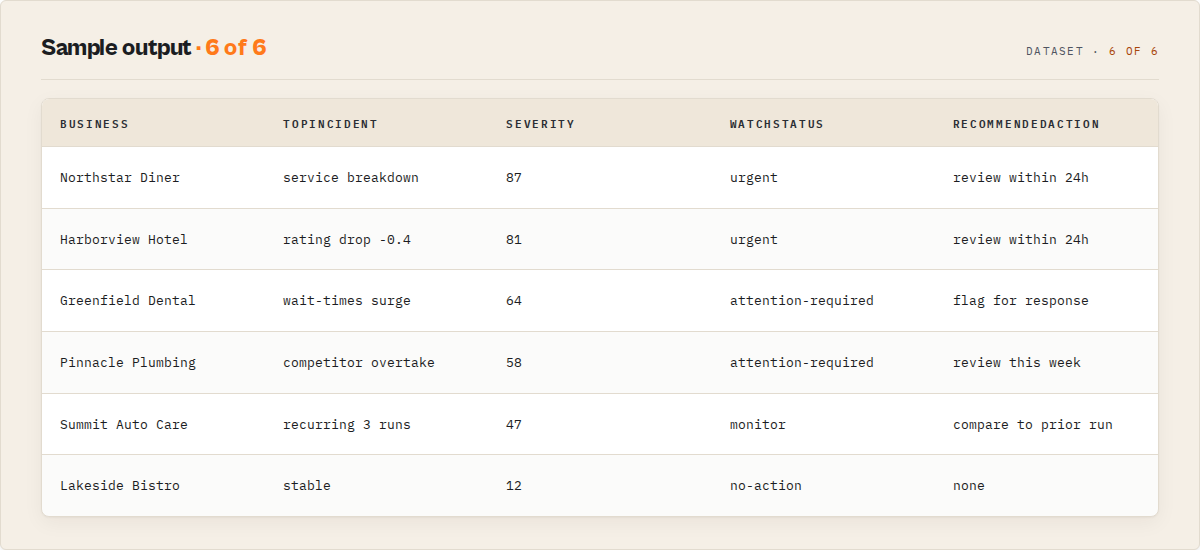
{
  "schemaVersion": "1.0",
  "recordType": "business",
  "eventId": "yelp_northstar-diner-san-francisco",
  "businessName": "Northstar Diner",
  "address": "412 Mission St, San Francisco, CA",
  "phoneNumber": null,
  "rating": 3.9,
  "reviewCount": 431,
  "url": "https://www.yelp.com/biz/northstar-diner-san-francisco",
  "reviewText": "Great food, but the wait was over 40 minutes.",
  "incident": {
    "incidentId": "inc_3921",
    "category": "service_breakdown",
    "status": "escalating",
    "severity": { "severityScore": 87, "customerImpact": "high", "spread": "single-location", "duration": "sustained", "momentum": "worsening" },
    "noveltyClass": "known_pattern",
    "primaryTheme": "wait_times",
    "affectedBusinessIds": ["yelp_northstar-diner-san-francisco"],
    "supportingSignals": ["rating_drop", "negative_theme_surge"],
    "runsOpen": 2,
    "operationalSummary": "Wait-time complaints rising alongside a 0.4-star slide over the last 30 reviews.",
    "evidenceTrail": { "supportingReviewCount": 42, "comparisonWindowDays": 7, "baselineWindowDays": 90 }
  },
  "attentionIndex": { "value": 84, "breakdown": { "activeSignals": 2, "ratingDrop": 0.4, "negativeThemeShare": 0.28 }, "drivers": ["Rating dropped 0.4 stars", "'wait times' now 28% of negative reviews"] },
  "watchStatus": "urgent",
  "whyNow": ["Rating dropped 0.4 stars over the last 30 reviews.", "'wait times' complaints rose from 19% to 28% of negative reviews."],
  "recommendedAction": "Review this location's slipping reputation within 24 hours.",
  "attentionWindow": { "urgency": "high", "recommendedReviewWithinHours": 24 },
  "signalEvents": [
    { "type": "rating_drop", "signalStrength": 0.88, "decayStatus": "active", "reason": "Rolling rating fell 0.4 stars (4.3 -> 3.9) over the last 30 reviews.", "evidence": { "ratingBefore": 4.3, "ratingAfter": 3.9, "windowReviews": 30 } }
  ],
  "signalProfile": "reputation-at-risk",
  "reviewIntelligence": {
    "status": "full",
    "method": "lexicon-tfidf-v1",
    "themeOntologyVersion": "1.2",
    "sampleSize": 120,
    "sentiment": { "positive": 0.52, "negative": 0.31, "neutral": 0.17, "confidenceBand": "high" },
    "ratingDistribution": { "5": 60, "4": 22, "3": 8, "2": 14, "1": 16 },
    "themes": [
      { "themeCode": "wait_times", "polarity": "negative", "label": "Wait times", "weight": 0.28, "keywords": ["wait", "slow", "long", "line"] },
      { "themeCode": "staff_friendliness", "polarity": "positive", "label": "Friendly staff", "weight": 0.21, "keywords": ["friendly", "helpful", "staff"] }
    ],
    "limitations": ["Theme labels are deterministic keyword labels, not generated summaries."]
  },
  "sampling": { "strategy": "adaptive", "reviewsAnalyzed": 120, "reviewsAvailable": 431, "samplingMethod": "weighted_recent" },
  "dataCompleteness": {
    "advertisedFieldsPresent": { "businessName": true, "address": true, "phoneNumber": false, "rating": true, "reviewText": true },
    "completenessScore": 0.8,
    "missingFields": ["phoneNumber"],
    "missingReason": "Yelp listing did not expose a phone number on the business page.",
    "extractionMethod": "business-page"
  }
}
Output fields
| Field | Type | Description |
|---|---|---|
recordType | string | business, review, portfolio_correlation, summary, or error. |
eventId | string | Stable dedup key (Yelp slug or review id); monitor delta diffs on this. |
businessName / address / phoneNumber / rating / reviewText | mixed | tri_angle-compatible advertised fields. |
dataCompleteness | object | Per-record advertised-field contract: which fields were populated and why any are missing. |
incident | object | The headline object: grouped signals with severity, status, lifecycle, and stable incidentId. |
incident.severity.severityScore | integer | 0-100 composite severity; ranks incidents in the queue. |
incident.noveltyClass | string | known_pattern or new_pattern. |
attentionIndex | object | Per-record routing scalar (0-100) with breakdown and top drivers. |
watchStatus | string | no-action, monitor, attention-required, urgent, or critical. |
whyNow | array | Plain-English reasons this record needs attention now. |
recommendedAction | string | Prioritisation-only instruction (max 80 chars). Never an in-Yelp action. |
attentionWindow | object | Machine routing primitive: urgency and recommendedReviewWithinHours. |
signalEvents | array | Eight typed, evidenced, decay-aware signal events. |
signalProfile | string | The business's reputation archetype (8-value enum). |
reviewIntelligence | object | Deterministic sentiment + theme synthesis (lexicon-tfidf-v1). |
ratingTrajectory | object | Multi-run rating direction (monitor, run 3+; null before). |
reputationMemory | object | Theme recurrence memory; matures over runs. |
fragility | object | Forward-looking instability heuristic (monitor, run 3+). |
attentionDebt | object | "How far behind" composite; works from run 1. |
compSetPosition | object | Within-comp-set percentile and distance from average. |
competitivePressure | object | How aggressively the comp set is improving. |
alertState | object | Cross-run repeat suppression on unchanged incidents. |
suppressedSignals | array | Within-run signals filtered as noise, with reason. |
evidenceQuality | object | Sample strength, coverage, signal agreement, confidence warnings. |
sampling | object | Reviews analysed versus available and the sampling method. |
changeFlags | array | Monitor-mode flags such as RATING_DOWN, NEW_NEGATIVE_THEME. |
How much does it cost to monitor Yelp reputation?
Yelp Scraper uses pay-per-event pricing - you pay $0.15 per business analysed, plus $0.001 per review and $0.20 per search, comp-set, or monitor execution. Platform compute costs are included.
The per-business charge covers the whole analysis for that business: its reviews, sentiment, complaint and praise themes, rating trajectory, comp-set position, incident grouping and attention routing. There is no separate charge for the intelligence layer.
Reviews come from each business's own page, typically 10 to 15 of them, so the review component of a bill is usually one to two cents per business. The exact count is disclosed on every record in sampling.reviewsAnalyzed alongside reviewsAvailable, so you can always see the difference between what Yelp publishes and what was analysed.
| Scenario | Businesses | Reviews | Execution | Total cost |
|---|---|---|---|---|
| Single location, one-shot | $0.15 | ~$0.012 | - | ~$0.16 |
| Category scan, 3 businesses | $0.45 | ~$0.036 | $0.20 | ~$0.69 |
| 12-location portfolio, monitor | $1.80 | ~$0.144 | $0.20 | ~$2.14 |
| Category scan, 50 businesses | $7.50 | ~$0.600 | $0.20 | ~$8.30 |
Monitor mode adds no extra per-business charge: a monitor run costs the same per business as a one-shot run. Set a spending limit on the actor to cap costs.
Why it costs more than a bulk row exporter. A row exporter sells you Yelp's fields. This actor renders each business page in a real browser and returns a decision: which locations need attention, why, and what changed since last time. That rendering is the bulk of the cost and it is what makes the sentiment, themes and trajectory possible at all. If you need 10,000 raw rows and intend to analyse them yourself, a bulk exporter is the cheaper tool and you should use it. If you are deciding where to spend your team's attention this week across a portfolio, one $0.15 business record replaces the reading of several hundred reviews.
Monitor Yelp reputation using the API
Python
from apify_client import ApifyClient

client = ApifyClient("YOUR_API_TOKEN")

run = client.actor("ryanclinton/yelp-scraper").call(run_input={
    "mode": "monitor",
    "track": ["https://www.yelp.com/biz/your-restaurant-san-francisco"],
    "rankBy": "attention",
})

for item in client.dataset(run["defaultDatasetId"]).iterate_items():
    inc = item.get("incident") or {}
    print(f"{item.get('businessName')}: {item.get('watchStatus')} - {inc.get('operationalSummary')}")
JavaScript
import { ApifyClient } from "apify-client";

const client = new ApifyClient({ token: "YOUR_API_TOKEN" });

const run = await client.actor("ryanclinton/yelp-scraper").call({
    mode: "monitor",
    track: ["https://www.yelp.com/biz/your-restaurant-san-francisco"],
    rankBy: "attention",
});

const { items } = await client.dataset(run.defaultDatasetId).listItems();
for (const item of items) {
    console.log(`${item.businessName}: ${item.watchStatus} - ${item.incident?.operationalSummary ?? "no incident"}`);
}
cURL
curl -X POST "https://api.apify.com/v2/acts/ryanclinton~yelp-scraper/runs?token=YOUR_API_TOKEN" \
  -H "Content-Type: application/json" \
  -d '{ "mode": "monitor", "track": ["https://www.yelp.com/biz/your-restaurant-san-francisco"], "rankBy": "attention" }'

curl "https://api.apify.com/v2/datasets/DATASET_ID/items?token=YOUR_API_TOKEN&format=json"
How Yelp Scraper works
Mental model: Yelp pages -> substrate fetch -> deterministic signal detection -> incident grouping -> ranked queue.
Substrate extraction
Yelp Scraper fetches public business listing and review pages using a fast HTML path with a full-browser fallback for client-rendered content and pages that challenge automated access. Every record carries a dataCompleteness block reporting which advertised fields resolved.
Deterministic intelligence
Review text runs through the lexicon-tfidf-v1 engine: VADER lexicon sentiment plus TF-IDF theme clustering against a versioned theme ontology. No LLM is involved, so results re-run byte-identical. Signal detection then fires typed events when thresholds cross (a 0.3-star rolling drop, a 0.10 theme-share shift, a 2x velocity spike).
Incident grouping and lifecycle
When two or more correlated signals fire on a business or across a portfolio, they group into one incident with a stable incidentId, a severityScore, and a five-state lifecycle (open, escalating, stabilizing, resolved, resurfaced). The incidentId is reused when a resolved incident re-crosses threshold within 90 days, so recurrence is visible.
Cross-run memory
In monitor mode, state persists in a named key-value store keyed on watchlistName. Rating trajectory, theme recurrence, and incident history accumulate run over run and cannot be backfilled.
Tips for best results
- Schedule monitor runs. The value compounds. A weekly run across your locations builds the trajectory and recurrence history that one-shot scraping can never reconstruct.
- Keep one watchlist per logical group. A franchise region or an agency client should each get a stable
watchlistNameso memory stays clean. - Raise reviewsSamplePerBusiness for thin sentiment. A larger sample lifts the confidence band and avoids
lexicon_fallback. - Branch automations on enums, not scores. Filter on
watchStatus IN ('urgent','critical')andincident.status, not rawattentionIndexvalues. - Use the Suppressed view to tune trust. Seeing what the actor ignored and why builds confidence in the alerts it does raise.
- Combine with comp-set runs. Pair a monitor watchlist with a periodic compset run to catch competitors overtaking you.
Combine with other Apify actors
| Actor | How to combine |
|---|---|
| Google Maps Lead Enricher | Find local businesses, then monitor their Yelp reputation. |
| Website Contact Scraper | Pull contact details for businesses flagged in the incident queue. |
| Trustpilot Review Analyzer | Add Trustpilot sentiment alongside Yelp for a fuller reputation view. |
| Multi-Review Analyzer | Combine Yelp themes with other review platforms. |
| HubSpot Lead Pusher | Push at-risk locations or prospects into HubSpot. |
| Company Deep Research | Build a full company profile around a monitored business. |
Limitations
- Maturity-gated intelligence. Rating trajectory, reputation memory, fragility, and forecasting need watchlist run 3 or later. They carry honest nulls before then; the memory clock cannot be backfilled.
- Within-run benchmarking only. Comp-set position is computed against the businesses in the run. Absolute category or metro percentile is not yet available (planned for a later version).
- Yelp anti-bot conditions. Yelp restricts automated access from shared IPs. Residential proxy is required, and heavy blocking can leave coverage gaps, which the
coverageblock reports honestly. - Sentiment on thin samples. Below the clustering threshold, review intelligence degrades to
lexicon_fallback(sentiment only). Theme labels are deterministic keyword labels, not generated summaries. - Descriptive, not predictive. Signals are interpretations of observed data, not predictions.
signalStrengthandfragilityare heuristics, never calibrated probabilities. - Public data only. It does not log in, bypass CAPTCHAs, or access private content.
Integrations
- Zapier - Send urgent incidents to Slack or email when
watchStatushitscritical. - Make - Route flagged reviews to a team based on
workflow.teamRouting. - Google Sheets - Export the incident queue for a weekly franchise review.
- Apify API - Trigger monitor runs on a schedule from any HTTP client.
- Webhooks - Fire on run completion to update a dashboard or open a Jira ticket per
incidentId. - LangChain / LlamaIndex - Feed structured reputation incidents into an AI reputation-assistant workflow.
How do I migrate from another Yelp scraper?
Paste your existing startUrls or searchQuery input straight in; Yelp Scraper accepts the same shape and maps it to the right mode. Set outputProfile: "compat" to verify exact five-field parity, then switch to signals to turn on the intelligence layer. Downstream code reading item.phoneNumber keeps working unchanged.
Why does my Yelp scraper return blank business names and missing phone numbers?
Most scrapers drop a field silently when a Yelp listing does not expose it, leaving a blank column with no explanation. Yelp Scraper reports the gap on every record in dataCompleteness, telling you which advertised fields were populated, which are missing, and why, so you can trust the data you do get.
Troubleshooting
Trajectory and memory fields are null. This is expected before watchlist run 3. These fields are maturity-gated and cannot be backfilled. Schedule recurring monitor runs and the values mature over time.
Review sentiment shows status lexicon_fallback. The review sample was too thin to cluster themes reliably. This is common for a business with few published reviews; the score is still returned, with the confidence band reported honestly.
Coverage shows failed pages. Yelp blocked some requests. Keep the residential proxy enabled and re-run; the coverage block reports exactly what was requested versus returned.
The same incident alerts every run. Set a watchlistName so cross-run state persists. With state, alertState suppresses unchanged incidents and re-alerts only on material change.
Key takeaways
- Decisions, not rows - The default Incident Queue ranks reputation issues by a 0-100 severity score across a five-state lifecycle.
- One charge, whole analysis - $0.15 per business covers its reviews, sentiment, themes, trajectory and comp-set position. No separate charge for the intelligence layer.
- Deterministic intelligence - Sentiment and themes use
lexicon-tfidf-v1with no LLM, so every result re-runs byte-identical. - Compounding memory - Monitor mode builds trajectory and theme recurrence from run 1 that a competitor cannot backfill.
- Drop-in migration - Accepts the tri_angle input shape and reports field completeness on every record.
Responsible use
- Yelp Scraper extracts publicly available business and review data from Yelp. It does not bypass authentication, CAPTCHAs, or access restricted content, and it performs no in-Yelp actions (no posting, drafting, disputing, or soliciting reviews).
- It does not label individual reviewers as fake or fraudulent, and it does not make business-quality verdicts. Review-velocity signals are descriptive volume measures, not accusations of manipulation.
- Users are responsible for ensuring their use complies with applicable laws and platform terms, including data protection regulations and FTC review guidance in their jurisdiction.
- For guidance on web scraping legality, see Apify's guide.
FAQ
What is the difference between a Yelp scraper and a Yelp reputation monitor? A scraper extracts business listings and review text and stops. A reputation monitor interprets that data over time: it correlates changes into incidents, synthesises sentiment and themes, and tells you which locations need attention first. Yelp Scraper does both.
Can I use Yelp Scraper to monitor many locations at once? Yes. Put all your /biz/ URLs in track with a shared watchlistName. The actor returns a portfolio-level incident queue and detects complaint themes that appear across multiple locations.
Can I get the exact same fields as my old Yelp scraper? Yes. Set outputProfile: "compat" for the exact five-field set (businessName, address, phoneNumber, rating, reviewText) plus a dataCompleteness block, with no signal fields.
Can I run it without the intelligence layer? Yes. Use outputProfile: "compat" or minimal, or set includeReviewsSample: false for a faster substrate-only run.
How does the actor detect a rating drop? It tracks a rolling rating over a recent-review window and fires a rating_drop signal when the rating falls by 0.3 stars or more, with the before, after, and window size attached as evidence.
How is review sentiment calculated? Deterministically, with the lexicon-tfidf-v1 engine: VADER lexicon sentiment plus TF-IDF theme clustering against a versioned ontology. No LLM is used, so the same input always yields the same output.
What does the incident severityScore mean? It is a bounded 0-100 composite of customer impact, spread, duration, and momentum that ranks incidents in the queue. No single component dominates.
Why are some fields null on my first run? Trajectory, reputation memory, and fragility are maturity-gated to watchlist run 3 and later. The actor returns honest nulls rather than fabricate history that did not happen.
Does this actor reply to or dispute reviews for me? No. It routes attention only. recommendedAction uses prioritisation verbs (Review, Flag for response, Monitor); it never drafts, posts, disputes, or solicits reviews. You respond off-platform in your own words.
Does it detect fake reviews? No. It reports review velocity descriptively (volume versus baseline) but never labels an individual reviewer or review as fake. That would be a defamation exposure the actor does not take.
Is it a practical alternative to a flat Yelp scraper for reputation work? For teams that end up reading rows in a spreadsheet to decide what matters, yes: it replaces that workflow with a ranked, evidenced incident queue. For bulk row export it is the wrong tool and costs more per business than one, so pick by the job rather than the price.
Is it legal to scrape Yelp? Yelp Scraper accesses only public business and review pages and performs no in-platform actions. Whether your specific use is permitted depends on your jurisdiction, intended use, and Yelp's terms, including data protection and FTC review rules. Consult legal counsel for your situation; this is not legal advice.
Help us improve
If you encounter issues, you can help us debug faster by enabling run sharing in your Apify account:
- Go to Account Settings > Privacy
- Enable Share runs with public Actor creators
This lets us see your run details when something goes wrong, so we can fix issues faster. Your data is only visible to the actor developer, not publicly.
Support
Found a bug or have a feature request? Open an issue in the Issues tab on this actor's page. For custom solutions or enterprise integrations, reach out through the Apify platform.
Related actors
AI Cold Email Writer — $0.01/Email, Zero LLM Markup
Generates personalized cold emails from enriched lead data using your own OpenAI or Anthropic key. Subject line, body, CTA, and optional follow-up sequence — $0.01/email, zero LLM markup.
B2B Lead Generation Suite - Find Emails, Score & Qualify Leads
All-in-one B2B lead pipeline. Enter company URLs, get enriched leads with emails, phone numbers, contacts, email patterns, quality scores (0-100), grades, and business signals from a 3-step automated pipeline.
B2B Lead Qualifier - Score & Rank Company Leads
B2B lead scoring tool and API that scores companies 0-100 from 30+ website signals. 5 scoring categories, 4 profiles (sales, marketing, recruiting, default). Plain-English explanations, hiring detection, industry classification, score change tracking. $0.15/lead, no subscription.
Bulk Email Verifier — MX, SMTP & Disposable Detection at Scale
Verify email deliverability in bulk — MX records, SMTP mailbox checks, disposable detection (55K+ domains), role-based flagging, catch-all detection, domain health scoring (SPF/DKIM/DMARC), and confidence scores. $0.005/email, no subscription.
Ready to try Yelp Scraper - Review Sentiment & Reputation Monitor?
Run it on your own Apify account. Apify offers a free tier with $5 of monthly credits.
Open on Apify Store