Event Lead Extractor — Speakers & Attendees is an Apify actor on ApifyForge. Extract company leads from event sponsor, exhibitor, and speaker pages. Crawls Eventbrite, conference sites, and trade show pages. It costs $0.25 per lead-extracted. Best for sales teams and marketers who need verified contact data, lead lists, or prospect enrichment at scale. Not ideal for real-time monitoring or historical data analysis. Maintenance pulse: 93/100. Last verified March 26, 2026. Built by Ryan Clinton (ryanclinton on Apify).
Event Lead Extractor — Speakers & Attendees
Event Lead Extractor — Speakers & Attendees is an Apify actor available on ApifyForge at $0.25 per lead-extracted. Extract company leads from event sponsor, exhibitor, and speaker pages. Crawls Eventbrite, conference sites, and trade show pages. Enriches each lead with emails, phones, social profiles, email patterns, and B2B lead quality scores.
Best for sales teams and marketers who need verified contact data, lead lists, or prospect enrichment at scale.
Not ideal for real-time monitoring or historical data analysis.
What to know
- Results depend on publicly available data; private or gated contacts may not be found.
- Email verification accuracy varies by domain and provider policies.
- Requires an Apify account — free tier available with limited monthly usage.
Maintenance Pulse
93/100Cost Estimate
How many results do you need?
Pricing
Pay Per Event model. You only pay for what you use.
| Event | Description | Price |
|---|---|---|
| lead-extracted | Charged per lead extracted from event pages. Includes event page crawling, external link discovery, and 3-actor enrichment pipeline. | $0.25 |
Example: 100 events = $25.00 · 1,000 events = $250.00
Documentation
The event intelligence engine for sales, partnerships, sponsorship, and competitive-research teams.
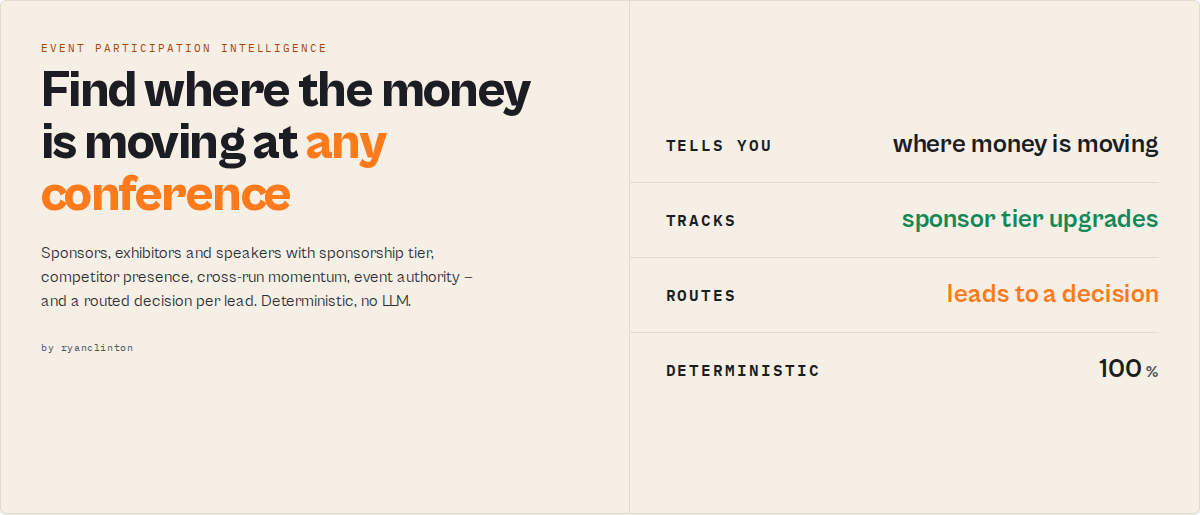
Discover the sponsors, exhibitors, speakers, and partners at any conference website — then track sponsorship upgrades, competitor presence, repeat participation, and emerging vendors across entire event seasons. Paste in event URLs from Eventbrite, Lu.ma, Sched, Bizzabo, or any conference site; get back scored, classified, routed company intelligence.
Questions this actor answers
- Which companies are increasing their event investment (Bronze → Platinum upgrades)?
- Which events are worth sponsoring or attending?
- Which competitors are showing up at every conference?
- Which vendors appear across the entire industry circuit?
- Which sponsors are new entrants this season?
- Which companies should my team contact first?
Traditional event scrapers extract links. This is event participation intelligence — it tracks how companies invest in conferences over time.
One run across an event season
Point it at a season of industry events (scheduled under one watchlist) and the summary record reports, for example:
{
  "recordType": "summary",
  "coverage": { "eventsCrawled": 24, "domainsFound": 1387 },
  "insights": {
    "recommendedEvents": [ { "event": "RSA Conference", "authorityScore": 94 }, { "event": "Black Hat", "authorityScore": 90 } ],
    "newEntrants": ["openai.com", "anthropic.com"]
  },
  "watchlist": {
    "upgradedSponsors": ["mongodb.com", "datadog.com"],
    "seriesIntelligence": { "repeatSponsors": 94, "retentionRate": 0.81 }
  }
}
(Illustrative — field names are exactly what the actor returns.)
What makes this valuable
A sponsor appearing once is noise. A sponsor appearing at RSA, Black Hat, Infosecurity Europe, and the Gartner Security Summit in the same year is a signal — it reveals marketing budget, partnership activity, expansion plans, and industry focus.
This actor turns those signals into structured intelligence: repeat sponsors, sponsorship upgrades, competitor presence, emerging vendors, and high-authority events — so you focus on where money is moving. Most companies treat conferences as a marketing expense; this treats every sponsor list as a map of who is investing in your market.
The real output
Beyond the per-company leads, every run emits one summary record — the answers, not just the data:
{
  "recordType": "summary",
  "insights": {
    "topSponsors": [ { "domain": "datadog.com", "appearances": 7 } ],
    "recommendedEvents": [ { "event": "RSA Conference", "authorityScore": 92, "reason": "tier-1, 84 sponsors, large scale" } ],
    "newEntrants": ["openai.com", "anthropic.com"],
    "upgradedSponsors": ["mongodb.com"]
  },
  "shareOfVoice": { "crowdstrike.com": 41, "sentinelone.com": 33, "wiz.com": 26 }
}
Why this is different
Most event scrapers return a list of links:
{ "url": "https://www.datadog.com", "domain": "datadog.com" }
This returns a decision:
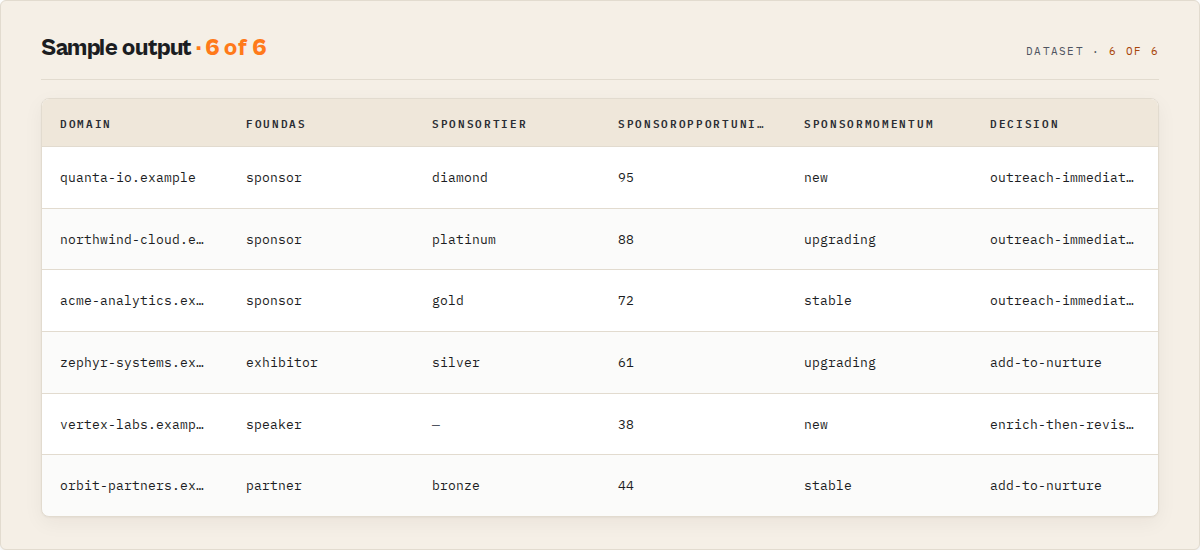
{
  "company": "datadog.com",
  "foundAs": "sponsor",
  "sponsorTier": "platinum",
  "appearanceCount": 7,
  "sponsorMomentum": "upgrading",
  "sponsorOpportunity": 88,
  "competitorMatch": false,
  "decision": "outreach-immediately"
}
The difference is intelligence, not extraction.
What you'll learn from a single run
- Event intelligence — which events matter (
eventAuthorityScore,eventTier), which attract the most sponsors, how big each is - Competitive intelligence — where your competitors are sponsoring (
competitorMatch), theirshareOfVoice, and new sponsor entrants - Market intelligence — which vendors appear everywhere (
appearanceCount,multiEvent), which are increasing investment (sponsorMomentum) - Lead intelligence — who to contact (
decision,accountReadiness), contact difficulty, and outreach priority
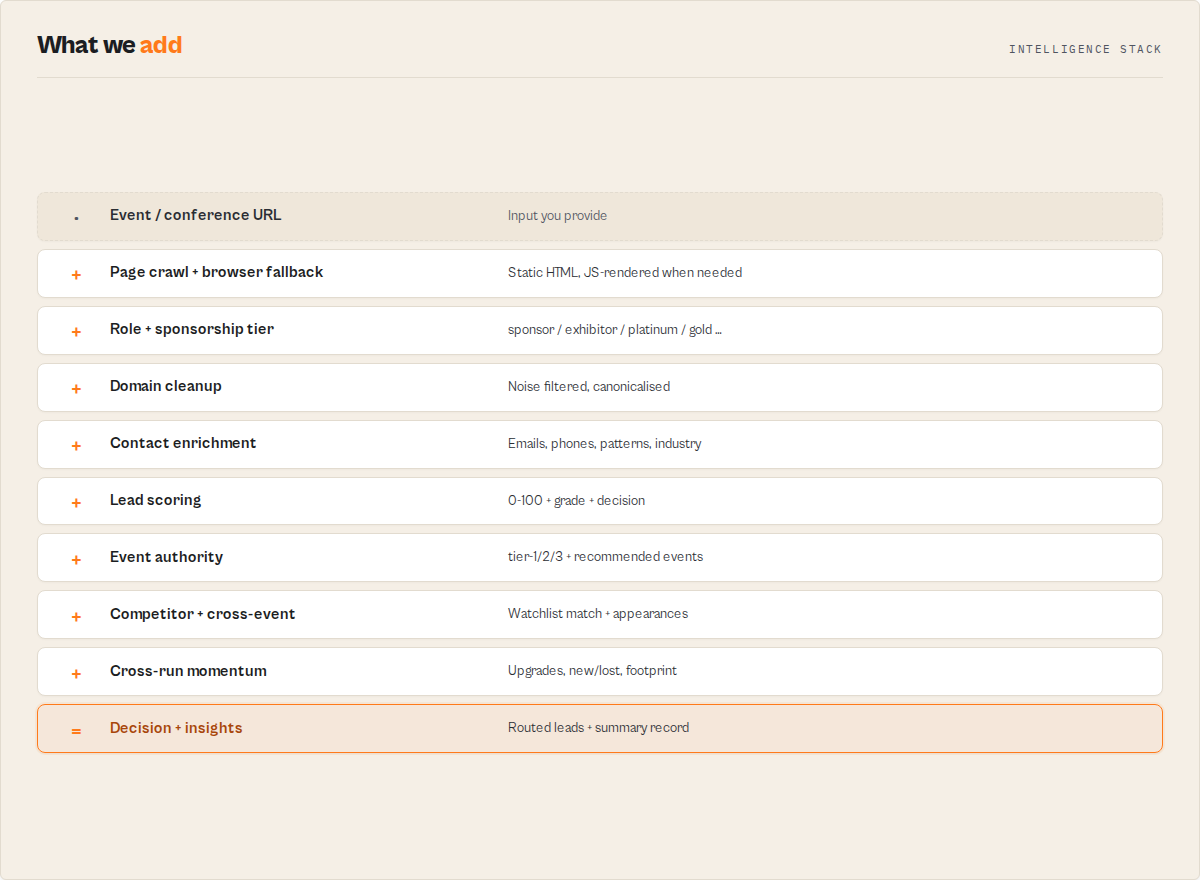
Before vs after
Before — open the sponsors page, copy company names, research each website, find contacts, check which are competitors, build a spreadsheet, repeat for 50 events.
After — one run returns topSponsors, recommendedEvents, newEntrants, upgradedSponsors, per-lead decision, and (on a schedule) what changed since last time.
Signals you can't get from a one-time scrape
A one-time scrape can only tell you what's on the page today:
{ "company": "mongodb.com", "sponsorTier": "gold" }
Set a watchlistName and run on a schedule, and the actor builds a proprietary event-participation history a single scrape can't reproduce:
{
  "company": "mongodb.com",
  "sponsorTier": "platinum",
  "changeFlag": "TIER_UPGRADED",
  "sponsorMomentum": "upgrading",
  "eventFootprint": { "runsSeen": 7, "sponsoredAppearances": 6 }
}
You see sponsorship upgrades, sponsor churn, repeat appearances, cross-event participation, and competitor share of voice accumulate over time. Competitors can clone a scraper; they can't clone your history.
Watch sponsorship changes over time
Run 1 — MongoDB is a Gold sponsor:
{ "company": "mongodb.com", "sponsorTier": "gold" }
Run 2 (same watchlist, next quarter) — it upgraded:
{ "company": "mongodb.com", "sponsorTier": "platinum", "changeFlag": "TIER_UPGRADED", "sponsorMomentum": "upgrading" }
The summary surfaces it automatically:
{ "watchlist": { "upgradedSponsors": ["mongodb.com"], "newSponsors": ["openai.com"], "lostSponsors": ["legacyvendor.com"] } }
A tier upgrade is a budget-increase signal — the moment to reach out.
Example workflow: find companies increasing event spend
- Run in
reconmode across 20 industry events under onewatchlistName(fast, no enrichment cost). - On the next scheduled run, set the intelligence filters:
requireMomentum: "upgrading",minAppearanceCount: 3,minSponsorOpportunity: 75. - Export the dataset — only companies actively escalating their event investment land in it (you're not charged for the rest).
The result is a shortlist of vendors putting money into the market right now.
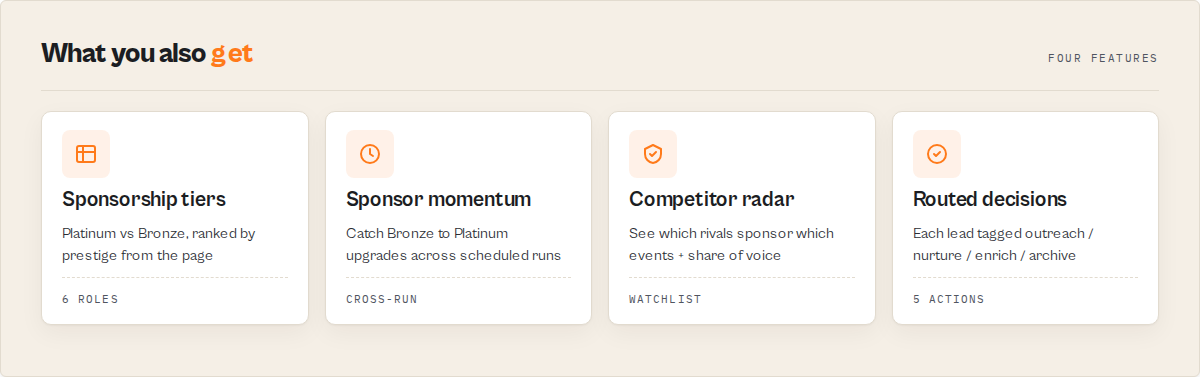
Event Lead Extractor vs generic event scrapers
| Capability | Generic scraper | Event Lead Extractor |
|---|---|---|
| Sponsor / speaker extraction | ✅ | ✅ |
| Sponsorship tier detection | ❌ | ✅ |
| Competitor tracking | ❌ | ✅ |
| Cross-event activity | ❌ | ✅ |
| Sponsor momentum (cross-run) | ❌ | ✅ |
| Event authority scoring | ❌ | ✅ |
| Event recommendations | ❌ | ✅ |
| Lead routing decisions | ❌ | ✅ |
Who it's for
- SDRs / AEs — find sponsors attending 5+ events and prioritise outreach by
sponsorOpportunityanddecision. - Partnership managers — track which competitors are sponsoring which industry events.
- Sponsorship / event teams — spot companies upgrading sponsorship levels and the highest-authority events to target.
- Competitive-intelligence / investors — see which vendors are appearing across the whole industry circuit and who's expanding into your market.
Modes
Pick a mode to match the job — each presets the right filters and enrichment:
| Mode | What it does |
|---|---|
full (default) | Crawl + full contact/score enrichment on every company |
recon | Fast event scan — domains, sponsor tiers, and event authority only. No enrichment, no sub-actor cost. For scanning many events before committing budget |
sponsor-hunter | Keep only sponsors (with tiers). For sponsorship-focused prospecting |
competitive-intel | Keep sponsors, partners & exhibitors, no enrichment — who's at the event, not their contacts |
Features
Discover
- Multi-source event crawling — handles Eventbrite, Lu.ma, Sched, Bizzabo, conference microsites, and any HTML event page with sponsor or speaker listings
- Automatic browser fallback — static HTML first for speed; JavaScript-heavy sponsor pages (React/Next/Swapcard/Hubilo/ExpoFP) that come back empty are re-rendered in a real browser automatically (
renderMode: "auto") — paste a URL and the actor figures out how to read it - Automatic subpage discovery — follows links to
/sponsors,/speakers,/exhibitors,/partners,/agenda, and similar subpages without manual configuration - Smart domain filtering — blocks 100+ noise domains (social networks, CDNs, analytics, payment processors, event platforms) so your results contain only real business leads
Analyse
- Intelligent role classification — tags every company as sponsor, exhibitor, partner, speaker, organizer, or linked from surrounding HTML context and section headings
- Sponsorship tier extraction — reads the section heading to tag each sponsor
title/diamond/platinum/gold/silver/bronze(+sponsorRankprestige order). A Diamond sponsor is a very different prospect than a Bronze one - JSON-LD and meta tag parsing — reads structured data (Schema.org Event, OpenGraph,
__NEXT_DATA__) for event title, date, and location
Intelligence
- Event authority scoring — a 0-100
eventAuthorityScore+tier-1/2/3+estimatedScaleper event, so you can decide whether an event is worth your budget before enrichment - Competitor watchlist — flag your competitors' presence with
watchDomains; every matching lead getscompetitorMatch: true - Cross-event activity —
appearanceCount+multiEventshow which companies appear across multiple events in the run; the summary listsrepeatCompanies[] - Cross-run sponsor momentum (opt-in) — set a
watchlistNameand re-run the same events on a schedule; each company then carrieschangeFlag(NEW / UNCHANGED / TIER_UPGRADED / TIER_DOWNGRADED) andsponsorMomentum, and the summary surfaces new vs lost sponsors + achangeFeed[]since last time. A sponsor upgrading Bronze → Platinum is a budget signal you can't get from a one-shot scrape - Company event footprint (opt-in) —
eventFootprintaccumulates each company's participation across every run on the watchlist (runsSeen,eventAppearances,sponsoredAppearances, first/last seen). The proprietary history competitors can't backfill - Competitive share of voice — with a
watchDomainswatchlist, the summary'sshareOfVoiceshows who owns more of the circuit among your tracked competitors - Industry rollup — when enrichment runs, the summary's
industryBreakdowncounts companies per vertical - Canonical domain resolution — a clean registrable-root dedup/join key across events
Recommend
- "Where should I focus?" insights — the summary's
insightsblock rankstopSponsors,recommendedEvents(highest-authority events to target, with a reason), and (on a watchlist)newEntrants+upgradedSponsors— the decision layer, synthesised from the run, no extra config - Series retention analytics — on a watchlist,
seriesIntelligencereportsretentionRate,repeatSponsorsandyearsTracked: which conferences keep their sponsors vs which are churning
Enrich & decide
- Full contact enrichment — calls Website Contact Scraper, Email Pattern Finder, and B2B Lead Qualifier to append emails, phones, social links, email patterns, industry, and a lead score
- Routed lead decision — every lead carries a
decision(outreach-immediately / add-to-nurture / enrich-then-revisit / archive / manual-review) your CRM or cadence tool branches on directly - Job modes & batch —
recon/sponsor-hunter/competitive-intel/fullpresets; process an entire conference season in one run (domains deduped across events)
Use Cases
Pre-event outreach
Event marketers preparing outreach campaigns who need a structured list of every sponsor and exhibitor with direct contact information. Run the actor on the event page two weeks before the conference and import leads into your CRM.
Trade show prospecting
Sales development reps (SDRs) mining trade show sponsor lists to build targeted account lists enriched with decision-maker emails and company quality scores. Filter by foundAs: "sponsor" to focus on companies with marketing budget.
Competitive sponsorship tracking
Business development managers tracking competitor sponsorship activity across industry events to identify partnership opportunities and understand market positioning.
Event audit
Conference organizers auditing their own events to understand which sponsors and speakers are most visible and how their contact information appears online.
Investor and partner discovery
Startup founders scanning accelerator demo days, pitch events, and investor conferences to identify potential partners, mentors, or customers exhibiting at those events.
Industry ecosystem mapping
Market researchers aggregating company participation data across multiple events to map industry ecosystems and identify trending vendors.
How to Use
- Gather event URLs. Copy the main event page URL from Eventbrite, Lu.ma, or any conference website. For best results, also include direct links to pages like
/sponsorsor/speakersif they exist. - Configure the input. Paste the URLs into the Event URLs field. Leave Discover Subpages enabled so the actor automatically finds sponsor and speaker listing pages. Set Max Leads Per Event to control output size.
- Choose enrichment level. Keep Skip Enrichment unchecked for full pipeline output (emails, phones, lead scores). Enable it if you only need a quick domain list without the extra cost of sub-actor calls.
- Run the actor. Click Start and wait for the pipeline to complete. The actor first crawls all event pages, then sequentially runs the Contact Scraper, Email Pattern Finder, and Lead Qualifier on every extracted domain.
- Export your leads. Download results as JSON, CSV, or Excel from the dataset tab.
Input Parameters
| Field | Type | Required | Default | Description |
|---|---|---|---|---|
eventUrls | string[] | Yes | — | URLs of event or conference pages. Include main page and optionally direct /sponsors, /speakers, or /exhibitors links |
mode | string | No | full | Run preset: full (crawl + enrichment), recon (fast scan, no enrichment), sponsor-hunter (sponsors only), competitive-intel (sponsors/partners/exhibitors, no enrichment). See Modes above |
renderMode | string | No | auto | auto = static HTML first, browser-render JS-heavy pages that came back empty; http = static only (cheapest); browser = render every event page. Browser rendering needs ≥2 GB memory (the default) |
watchDomains | string[] | No | [] | Competitor watchlist. Domains to flag when present (e.g. hubspot.com). Matching leads get competitorMatch: true; www/subdomain variants matched automatically |
watchlistName | string | No | — | Name a watchlist to turn on cross-run tracking. Re-run the same events under the same name and each company gets changeFlag + sponsorMomentum; the summary lists new/lost sponsors. Blank = stateless one-shot run |
discoverSubpages | boolean | No | true | Automatically find and crawl subpages like /sponsors, /speakers, /exhibitors, and /partners linked from the event URL |
maxLeadsPerEvent | integer | No | 50 | Maximum number of unique company domains to extract per event URL. Range: 1–500 |
skipEnrichment | boolean | No | false | When enabled, only extracts domains and skips enrichment sub-actors. Much faster and cheaper |
scoringProfile | string | No | sales | How the lead qualifier weights its categories: default, sales (contact-heavy), marketing (presence-heavy), or recruiting (team-heavy). Only applies when enrichment is on |
outputProfile | string | No | full | How much per-lead detail to write: full (every field), standard (drop agent diagnostics), minimal (decision surface only), or llm (decision surface + summary). All analysis runs internally regardless |
proxyConfiguration | object | No | — | Proxy settings for crawling event pages. Recommended for Eventbrite and other sites that block datacenter IPs |
Input Examples
Single conference, full enrichment:
{
  "eventUrls": ["https://www.tech-week.com/"],
  "discoverSubpages": true,
  "maxLeadsPerEvent": 100,
  "skipEnrichment": false
}
Multiple events, quick domain scan:
{
  "eventUrls": [
    "https://www.tech-week.com/",
    "https://websummit.com/",
    "https://www.ces.tech/"
  ],
  "discoverSubpages": true,
  "maxLeadsPerEvent": 50,
  "skipEnrichment": true
}
Direct sponsor page with proxy:
{
  "eventUrls": [
    "https://www.eventbrite.com/e/my-event-12345",
    "https://www.eventbrite.com/e/my-event-12345/sponsors"
  ],
  "discoverSubpages": false,
  "maxLeadsPerEvent": 200,
  "skipEnrichment": false,
  "proxyConfiguration": { "useApifyProxy": true }
}
Input Tips
- Include direct subpage URLs for guaranteed coverage. Auto-discovery handles most cases, but explicit URLs ensure nothing is missed.
- Use Skip Enrichment for reconnaissance. Run with enrichment off first to preview lead counts, then re-run with enrichment on for high-value events only.
- Set Max Leads thoughtfully. Large trade shows (CES, Web Summit) may have 500+ exhibitors. Small meetups rarely exceed 20.
- Enable proxy for Eventbrite. Eventbrite serves limited HTML to bots — residential or auto proxy ensures the full sponsor list renders.
Output Example
Each item in the output dataset represents one company found at one event, enriched with contact data and a lead quality score:
{
  "recordType": "lead",
  "schemaVersion": "2.1.0",
  "eventId": "lead_3f8a1c9e7b2d4a06",
  "eventUrl": "https://www.tech-week.com/",
  "eventTitle": "London Tech Week 2025",
  "eventDate": "2025-06-09",
  "eventLocation": "ExCeL London, London",
  "domain": "datadog.com",
  "canonicalDomain": "datadog.com",
  "companyUrl": "https://www.datadog.com",
  "foundAs": "sponsor",
  "linkText": "Datadog",
  "sponsorTier": "platinum",
  "sponsorRank": 2,
  "sectionTitle": "Platinum Sponsors",
  "appearanceCount": 3,
  "eventRoles": ["sponsor", "speaker"],
  "multiEvent": true,
  "competitorMatch": false,
  "industry": "saas",
  "sponsorOpportunity": 88,
  "changeFlag": "TIER_UPGRADED",
  "sponsorMomentum": "upgrading",
  "firstSeenAt": "2024-06-10T09:00:00.000Z",
  "eventFootprint": { "runsSeen": 3, "eventAppearances": 9, "sponsoredAppearances": 7, "firstSeen": "2024-06-10T09:00:00.000Z", "lastSeen": "2025-06-09T09:00:00.000Z" },
  "emails": ["[email protected]", "[email protected]"],
  "phones": ["+1-866-329-4466"],
  "contacts": [
    { "name": "Sarah Chen", "title": "VP of Marketing", "email": "[email protected]" }
  ],
  "socialLinks": {
    "linkedin": "https://www.linkedin.com/company/datadog",
    "twitter": "https://twitter.com/datadoghq"
  },
  "emailPattern": "{first}.{last}@datadog.com",
  "emailPatternConfidence": 0.92,
  "generatedEmails": [
    { "name": "Sarah Chen", "email": "[email protected]" }
  ],
  "decision": "outreach-immediately",
  "shouldOutreach": true,
  "score": 87,
  "grade": "A",
  "confidence": { "score": 0.91, "level": "high", "components": [] },
  "accountReadiness": { "score": 84, "band": "hot", "reasons": ["verified personal email", "decision-maker contact found"] },
  "contactDifficulty": "easy",
  "whyNow": { "type": "partnership", "score": 72, "signals": ["partner-program"], "recommendedPersona": "VP of Marketing", "summary": "Active partner program — lead with co-marketing." },
  "painSignals": [
    { "signal": "actively-hiring", "evidence": ["12 open marketing roles"], "likelyPain": "scaling demand-gen capacity" }
  ],
  "summary": "Datadog — sponsor at London Tech Week. Grade A, verified VP-level contact, ready to outreach.",
  "agentContract": { "decision": "qualified-A", "confidence": 0.91, "nextAction": "outreach-immediately", "costToAct": 0 },
  "pipelineState": { "eventCrawled": true, "contactScraped": true, "patternFound": true, "qualified": true },
  "dataGaps": [],
  "nextActions": [],
  "pipelineSteps": ["event-crawl", "contact-scraper", "email-pattern-finder", "lead-qualifier"],
  "extractedAt": "2025-06-15T14:32:18.000Z"
}
Every run also pushes one recordType: "summary" record carrying a coverage block (events crawled, domains found / enriched / scored), run totals, matchedCompetitors[], shareOfVoice (each watched competitor's % of appearances among watched competitors present), repeatCompanies[] (companies appearing at ≥2 events this run), industryBreakdown[] (companies per vertical when enriched), an insights block (topSponsors / recommendedEvents / newEntrants / upgradedSponsors — the "where should I focus?" layer), a watchlist block (newSponsors[] / lostSponsors[] / tier-change counts / a consolidated changeFeed[] of "company: gold → platinum" / "removed" lines / seriesIntelligence retention analytics, when watchlistName is set), and a per-event rollup (… sponsorDensity …) (events[] with companies found, sponsor/exhibitor/speaker counts, average score, hot leads, ready-to-outreach, eventAuthorityScore 0-100, eventTier tier-1/2/3, estimatedScale small/medium/large, plus eventYear and eventSeries). Read the authority block to decide which events are worth enrichment budget before you spend it. The same object is mirrored to the run's key-value store under the SUMMARY key.
When enrichment is skipped (skipEnrichment: true), the contact, pattern, and decision-layer fields are empty arrays, empty objects, or null, and nextActions points at the sibling actors that would fill them.
Output Fields
Event Context Fields
| Field | Type | Description |
|---|---|---|
eventUrl | string | The input URL this lead was found on |
eventTitle | string/null | Event name extracted from page title, OpenGraph, JSON-LD, or __NEXT_DATA__ |
eventDate | string/null | Event start date (ISO 8601 or free text, depending on source) |
eventLocation | string/null | Venue name and/or city extracted from structured data |
Company Fields
| Field | Type | Description |
|---|---|---|
domain | string | Company domain as found (may include a subdomain) |
canonicalDomain | string | Registrable root domain (careers.microsoft.com → microsoft.com) — the dedup/join key |
companyUrl | string | Full URL as found on the event page |
foundAs | string | Classification: sponsor, exhibitor, partner, speaker, organizer, or linked |
linkText | string/null | Anchor text of the link on the event page |
Sponsorship & Event Intelligence
| Field | Type | Description |
|---|---|---|
sponsorTier | string/null | Tier from the section heading: title, diamond, platinum, gold, silver, bronze, startup, community, media. null when no tier language was present |
sponsorRank | integer/null | Prestige rank among tiered sponsors at this event (1 = most prestigious) |
sectionTitle | string/null | The page section heading the link sat under (e.g. "Platinum Sponsors") |
appearanceCount | integer | How many of this run's events the company appeared at (within-run only) |
eventRoles | string[] | Distinct roles the company held across this run's events |
multiEvent | boolean | True when the company appeared at >1 event in this run |
competitorMatch | boolean | True when canonicalDomain is in your watchDomains watchlist |
industry | string/null | Company industry from the qualifier's company intelligence (populated only when enrichment runs) |
Cross-Run Intelligence (only when watchlistName is set)
| Field | Type | Description |
|---|---|---|
changeFlag | string/null | Change vs the prior run on this watchlist: NEW, UNCHANGED, TIER_UPGRADED, TIER_DOWNGRADED |
sponsorMomentum | string/null | Tier trajectory: new, upgrading, downgrading, stable — the budget signal |
firstSeenAt | string/null | ISO timestamp the company was first seen on this watchlist |
eventFootprint | object/null | Accumulated participation across all runs on this watchlist: { runsSeen, eventAppearances, sponsoredAppearances, firstSeen, lastSeen }. The proprietary history a one-shot scrape can't reproduce |
How cross-run tracking behaves:
- Run 1 (baseline): every company gets
changeFlag: "NEW"andsponsorMomentum: "new"; the snapshot is saved. No new/lost lists yet. - Run 2+: companies are compared against the previous run —
changeFlag/sponsorMomentumpopulate, and the summary'swatchlistblock listsnewSponsors[]andlostSponsors[](present last run, gone now). - State lives in a named key-value store (
event-lead-<watchlistName>), so it survives dataset purges. Use the samewatchlistNameacross scheduled runs. State is bounded (50k companies, oldest dropped first). On restricted-permission tokens the actor degrades to a stateless run and logs a warning.
Contact Scraper Fields (from sub-actor)
| Field | Type | Description |
|---|---|---|
emails | string[] | Email addresses found on the company website |
phones | string[] | Phone numbers found on the company website |
contacts | array | Named contacts with name, title, and email |
socialLinks | object | Social media profile URLs (LinkedIn, Twitter, etc.) |
Email Pattern Fields (from sub-actor)
| Field | Type | Description |
|---|---|---|
emailPattern | string/null | Detected email format (e.g., {first}.{last}@domain.com) |
emailPatternConfidence | number/null | Confidence score (0–1) for the detected pattern |
generatedEmails | array | Emails generated using the pattern for discovered contacts |
Decision Layer
The decision fields are surfaced from the qualifier and contact scraper so you can route leads without re-reading the raw data. Branch your cadence tool / Zapier rule on decision or shouldOutreach; sort the list on accountReadiness.score.
| Field | Type | Description |
|---|---|---|
decision | string/null | Routing primitive: outreach-immediately, add-to-nurture, enrich-then-revisit, archive, or manual-review |
shouldOutreach | boolean/null | Send-now gate — true when the lead is ready to contact |
score | number/null | Lead quality score (0–100) |
grade | string/null | Letter grade (A through F) |
confidence | object/null | { score (0–1), level, components[] } — calibrated confidence in the score |
accountReadiness | object/null | { score (0–100), band (hot/warm/cool/cold), reasons[] } — the "contact this week?" headline; sort on .score |
contactDifficulty | string/null | Reachability band: easy, medium, hard, unreachable |
whyNow | object/null | Timing axis: { type, score, signals[], recommendedPersona, summary } |
painSignals | array/null | Inferred outreach hooks: [{ signal, evidence[], likelyPain }] (heuristic, evidence-backed) |
summary | string/null | Plain-English one-line lead summary an LLM can quote |
agentContract | object/null | Compact agent surface: { decision, confidence, nextAction, costToAct } |
sponsorOpportunity | integer | Participation-propensity signal (0-100): how active/escalating the company is as an event sponsor (frequency + tier + contactability + momentum). A distinct axis from the lead score — sort by it to find the most event-active companies. Not measured spend |
Suite Navigation
| Field | Type | Description |
|---|---|---|
pipelineState | object | What enrichment has been done: { eventCrawled, contactScraped, patternFound, qualified } |
dataGaps | array | [{ field, reason, suggestedFix }] — each suggestedFix names the sibling actor that closes the gap |
nextActions | string[] | Ordered sibling-actor slugs to run next to make the lead actionable |
Meta Fields
| Field | Type | Description |
|---|---|---|
recordType | string | lead, summary, or error — filter on this in SQL / Sheets / automation |
schemaVersion | string | Output-contract version (additive within a major version) |
eventId | string | Stable hash of (event URL + domain) — re-runs dedupe cleanly on this |
pipelineSteps | string[] | Which pipeline steps completed |
extractedAt | string | ISO 8601 timestamp of extraction |
Programmatic Access (API)
Python
from apify_client import ApifyClient

client = ApifyClient("YOUR_API_TOKEN")

run = client.actor("ryanclinton/event-lead-extractor").call(run_input={
    "eventUrls": ["https://www.tech-week.com/"],
    "discoverSubpages": True,
    "maxLeadsPerEvent": 100,
    "skipEnrichment": False,
})

for lead in client.dataset(run["defaultDatasetId"]).iterate_items():
    print(f"{lead['domain']} ({lead['foundAs']}) — "
          f"Score: {lead['score']}, Grade: {lead['grade']}")
    if lead["emails"]:
        print(f"  Emails: {', '.join(lead['emails'])}")
JavaScript
import { ApifyClient } from "apify-client";

const client = new ApifyClient({ token: "YOUR_API_TOKEN" });

const run = await client.actor("ryanclinton/event-lead-extractor").call({
  eventUrls: ["https://www.tech-week.com/"],
  discoverSubpages: true,
  maxLeadsPerEvent: 100,
  skipEnrichment: false,
});

const { items } = await client.dataset(run.defaultDatasetId).listItems();
items
  .filter((lead) => lead.foundAs === "sponsor")
  .forEach((lead) => {
    console.log(`${lead.domain}: Score ${lead.score} (${lead.grade})`);
    console.log(`  Emails: ${lead.emails.join(", ")}`);
  });
cURL
# Start the actor run
curl -X POST "https://api.apify.com/v2/acts/ryanclinton~event-lead-extractor/runs?token=YOUR_API_TOKEN" \
  -H "Content-Type: application/json" \
  -d '{
    "eventUrls": ["https://www.tech-week.com/"],
    "discoverSubpages": true,
    "maxLeadsPerEvent": 100,
    "skipEnrichment": false
  }'

# Fetch results (replace DATASET_ID from the run response)
curl "https://api.apify.com/v2/datasets/DATASET_ID/items?token=YOUR_API_TOKEN&format=json"
How It Works
- Discover — crawl each event page (static HTML first, browser fallback for JS-heavy pages) and follow
/sponsors,/speakers,/exhibitors,/partnerssubpages; filter out 100+ noise domains so only real business domains remain. - Classify — tag each company's role (sponsor / exhibitor / partner / speaker / organizer) and sponsorship tier from the section it sits under.
- Enrich — call the contact scraper, email-pattern finder, and lead qualifier on the unique domains to append contacts, email patterns, industry, and a 0–100 lead score.
- Track — score event authority, flag competitors, compute cross-event activity and (on a watchlist) cross-run momentum, new/lost sponsors, and footprint.
- Decide — route each lead to a
decision, and emit a summary record with theinsightsrecommendation layer.
Resilience: each enrichment sub-actor runs independently — if one fails the pipeline continues and those fields are empty rather than crashing the run. Deduplication: domains are deduped globally across events (a company at three events is enriched once, but appears per event it was found at).
Classification Reference
The actor classifies each extracted company based on keywords found in surrounding HTML:
| Classification | Trigger Keywords |
|---|---|
sponsor | sponsor, sponsored, sponsorship, presented by, brought to you by, platinum, gold, silver, bronze, diamond, title sponsor |
exhibitor | exhibitor, exhibit, booth, exhibition, expo |
partner | partner, partnership, community partner, media partner, technology partner |
speaker | speaker, keynote, panelist, presenter, moderator, fireside |
organizer | organizer, organiser, hosted by, organized by, organised by |
linked | No matching keywords found — generic external link |
Blocked Domain Categories
The domain filter blocks 100+ domains across these categories to ensure only real business leads appear in results:
| Category | Examples |
|---|---|
| Social media | facebook.com, twitter.com, linkedin.com, instagram.com, tiktok.com |
| Event platforms | eventbrite.com, lu.ma, meetup.com, hopin.com, bizzabo.com, cvent.com |
| CDNs / Infrastructure | cloudflare.com, googleapis.com, cloudfront.net, fastly.net |
| Analytics / Ads | google-analytics.com, doubleclick.net, hotjar.com, mixpanel.com |
| Big tech (too generic) | google.com, apple.com, microsoft.com, amazon.com |
| Email providers | gmail.com, outlook.com, yahoo.com |
| URL shorteners | bit.ly, t.co, tinyurl.com |
| CMS / Website builders | wordpress.com, squarespace.com, wix.com, medium.com |
| Payment processors | paypal.com, stripe.com |
Subdomains of blocked domains (e.g., cdn.example.com, static.example.com) are also filtered.
How Much Does It Cost?
Cost depends on how many events you process, how many company domains are found, and whether enrichment is enabled.
| Scenario | Events | Leads Found | Enrichment | Estimated Cost |
|---|---|---|---|---|
| Quick domain scan | 1 | ~30 | Skipped | ~$0.01 |
| Single event, full pipeline | 1 | ~50 | Full | ~$0.50 |
| 5 events, full pipeline | 5 | ~200 | Full | ~$2.00 |
| Conference season (20 events) | 20 | ~800 | Full | ~$8.00 |
Free plan users can process approximately 1–2 small events with enrichment per month. Skipping enrichment dramatically reduces cost since no sub-actors are called.
The enrichment phase accounts for most of the cost because it invokes three separate sub-actors once per unique domain. To reduce cost, enable Skip Enrichment for initial exploration and run the full pipeline only on high-value events.
Tips
- Include direct subpage URLs for best coverage. If the conference site has a dedicated
/sponsorsor/exhibitorspage, add it alongside the main event URL. - Use Skip Enrichment for quick reconnaissance. Run with enrichment off first to preview how many leads an event yields. Then re-run with enrichment on only if the domain list looks promising.
- Set Max Leads Per Event thoughtfully. For large trade shows with hundreds of exhibitors, increase the limit to 200–500. For small meetups, the default of 50 is more than enough.
- Enable proxy for Eventbrite and gated sites. Some event platforms serve limited HTML to bots. Using a residential or auto proxy ensures the full sponsor list is rendered.
- Batch related events together. Process an entire conference series or industry vertical in a single run. The actor deduplicates domains across events, so companies appearing at multiple events are enriched only once.
- Filter by foundAs field after export. If you only want sponsors, filter the CSV or JSON output by
foundAs === "sponsor"to exclude speakers, organizers, and generic links.
Use in Dify
Drop this actor into Dify workflows via the Apify plugin's Run Actor node. Each lead returns scored, classified, and routed as structured JSON — outreach-immediately / add-to-nurture / enrich-then-revisit / archive / manual-review plus the accountReadiness.band (hot/warm/cool/cold) and contactDifficulty (easy/medium/hard/unreachable) enums your downstream node branches on. A plain event-page scraper pointed at the same URL returns a list of links; this returns the decision of whether to work each lead, and how.
- Actor ID:
ryanclinton/event-lead-extractor - Sample input (full pipeline, decision-surface output for routing):
{
    "eventUrls": ["https://www.tech-week.com/"],
    "discoverSubpages": true,
    "maxLeadsPerEvent": 100,
    "skipEnrichment": false,
    "scoringProfile": "sales",
    "outputProfile": "minimal"
}
Branching example. Add an If/Else node after the Run Actor node and route on the decision field's equality match — no prose parsing:
decision == "outreach-immediately"→ push to your cadence tool / Salesloft / Instantly sequencedecision == "add-to-nurture"→ add to a marketing drip listdecision == "enrich-then-revisit"→ loop back through the actors named innextActions[]decision == "archive"→ droprecordType == "summary"→ readcoverage+events[]for the run-level rollup
For an automation gate, branch on the shouldOutreach boolean (true = send-now queue). For finer triage, sort or threshold on accountReadiness.score (0-100) and route phone-first vs email-first on contactDifficulty.
The nextActions[] array is usable verbatim — it lists the sibling actor slugs (website-contact-scraper, email-pattern-finder, b2b-lead-qualifier) to run next to make an incomplete lead actionable, in order. No LLM rewriting needed; a Dify iteration node can call each slug directly. Opt-in modes the workflow can leverage: scoringProfile (sales / marketing / recruiting weighting) and outputProfile (minimal returns only the decision surface for clean branching; llm adds the plain-English summary for an LLM node to quote).
Combine with Other Actors
| Actor | How to combine |
|---|---|
| Website Contact Scraper | Used internally by this actor for enrichment. Run standalone for deeper crawls (more pages per domain) |
| Email Pattern Finder | Used internally. Run standalone to test patterns for specific domains |
| B2B Lead Qualifier | Used internally. Run standalone for detailed score breakdowns with signal-level detail |
| B2B Lead Gen Suite | Full-pipeline B2B lead gen from any domain list — use when you already have domains and don't need event context |
| HubSpot Lead Pusher | Push event leads directly to HubSpot CRM with automatic field mapping |
| Company Deep Research | Deep-dive research on high-scoring event leads before outreach |
| Brand Protection Monitor | Monitor competitor event sponsorship activity over time |
| Lead Enrichment Pipeline | All-in-one Clay alternative: email discovery, verification, company research, and scoring in one run ($0.12/lead) |
| AI Outreach Personalizer | Generate personalized cold emails using your own OpenAI/Anthropic key — zero AI markup ($0.01/lead) |
| Intent Signal Tracker | Track buying signals: hiring, tech changes, funding, content updates. Prioritize outreach by intent score ($0.05/company) |
| Lead Data Quality Auditor | Audit lead data quality before outreach — email verification, phone validation, domain freshness ($0.005/record) |
Limitations
- JavaScript rendering is a fallback, not the default path — pages are read as fast static HTML first; only JS-heavy event pages (React/Next/Swapcard/Hubilo/ExpoFP) that return nothing are re-rendered in a real browser (
renderMode: "auto", default). Browser rendering needs ≥2 GB memory; on a leaner run those pages are read static-only with a warning. - No login/CAPTCHA support — only crawls publicly accessible pages. Cannot handle password-protected, login-gated, or CAPTCHA-protected event pages.
- No attendee data — only extracts company-level data from public sponsor, exhibitor, and speaker listings. Does not scrape attendee lists, registration forms, or personal profiles.
- Classification is heuristic — link classification depends on surrounding HTML context (headings, class names, text). Unconventional page structures may result in
linkedinstead of a specific role. - Sub-actor availability — enrichment depends on three sub-actors running successfully. If any sub-actor is temporarily unavailable or has a bug, those fields will be empty.
- Timeout for large events — events with 500+ exhibitors and full enrichment may exceed the default 2-hour actor timeout. Increase the timeout in settings or split across runs.
Responsible Use
- This actor only accesses publicly visible event pages and company websites.
- Extracted contact information (emails, phone numbers, names) should be used in compliance with applicable data protection laws (GDPR, CAN-SPAM, CCPA).
- Do not use this actor for unsolicited bulk email campaigns without proper opt-in consent.
- Respect rate limits and terms of service for event platforms.
- See Apify's guide on web scraping legality for general guidance.
FAQ
What event platforms are supported? Any event website that renders sponsor, exhibitor, or speaker links in HTML. Tested on Eventbrite, Lu.ma, Sched, Bizzabo, Swapcard, and hundreds of custom conference microsites.
How does the actor classify companies as sponsor vs. speaker vs. exhibitor?
It analyzes the HTML context around each external link — section headings, parent element class names, and nearby text. Keywords like "sponsor," "platinum," "exhibitor," "booth," "speaker," and "keynote" trigger the appropriate classification. Links without clear context are tagged as linked.
What happens if enrichment sub-actors fail?
Each enrichment step runs independently. If one fails, the pipeline continues with the remaining steps. Failed steps produce empty fields in the output rather than crashing the entire run. The pipelineSteps array shows which steps completed.
Can I process password-protected or login-gated event pages? No. The actor crawls publicly accessible HTML pages only.
How many events can I process in a single run? No hard limit on input URLs. In practice, runs with 20–50 event URLs complete within the default 2-hour timeout. For larger batches, increase the actor timeout or split across multiple runs.
Does the actor find individual attendee data? No. The actor only extracts company-level data from public sponsor, exhibitor, and speaker listings.
What does the lead score mean? The score (0–100) and letter grade (A through F) come from the B2B Lead Qualifier sub-actor. It evaluates contact reachability, business legitimacy, online presence, website quality, and team transparency. Higher scores indicate companies that are easier to reach and more likely to be legitimate business targets.
Can I use the output with my CRM? Yes. Export as CSV or JSON and import directly into HubSpot, Salesforce, Pipedrive, or any CRM that accepts flat file imports. Or use the HubSpot Lead Pusher actor for automated CRM sync.
Integrations
- Zapier — trigger a Zap when the run finishes and push leads to HubSpot, Salesforce, Slack, or 5,000+ other apps
- Make — use the Apify module to watch for completed runs and route leads through multi-step workflows
- Google Sheets — export directly to a spreadsheet for team collaboration and filtering
- Apify API — call the actor programmatically and fetch results as JSON for custom integrations
- Webhooks — receive a POST notification with the dataset ID when the run completes
Related actors
AI Cold Email Writer — $0.01/Email, Zero LLM Markup
Generates personalized cold emails from enriched lead data using your own OpenAI or Anthropic key. Subject line, body, CTA, and optional follow-up sequence — $0.01/email, zero LLM markup.
B2B Lead Generation Suite - Find Emails, Score & Qualify Leads
All-in-one B2B lead pipeline. Enter company URLs, get enriched leads with emails, phone numbers, contacts, email patterns, quality scores (0-100), grades, and business signals from a 3-step automated pipeline.
B2B Lead Qualifier - Score & Rank Company Leads
B2B lead scoring tool and API that scores companies 0-100 from 30+ website signals. 5 scoring categories, 4 profiles (sales, marketing, recruiting, default). Plain-English explanations, hiring detection, industry classification, score change tracking. $0.15/lead, no subscription.
Bulk Email Verifier — MX, SMTP & Disposable Detection at Scale
Verify email deliverability in bulk — MX records, SMTP mailbox checks, disposable detection (55K+ domains), role-based flagging, catch-all detection, domain health scoring (SPF/DKIM/DMARC), and confidence scores. $0.005/email, no subscription.
Ready to try Event Lead Extractor — Speakers & Attendees?
Run it on your own Apify account. Apify offers a free tier with $5 of monthly credits.
Open on Apify Store