E-Commerce Price Tracker — Deal & Opportunity Intelligence is an Apify actor on ApifyForge. Track prices across Shopify and any e-commerce store and get a decision for every product: buy now, wait, or skip. Detects fake sales, scores deals and opportunities, flags price drops and restocks, and surfaces only... It costs $0.05 per product-monitored. Best for e-commerce teams tracking competitor pricing, monitoring product catalogs, or gathering market intelligence. Not ideal for real-time price alerts or replacing dedicated repricing software. Maintenance pulse: 90/100. Last verified March 27, 2026. Built by Ryan Clinton (ryanclinton on Apify).
E-Commerce Price Tracker — Deal & Opportunity Intelligence
E-Commerce Price Tracker — Deal & Opportunity Intelligence is an Apify actor available on ApifyForge at $0.05 per product-monitored. Track prices across Shopify and any e-commerce store and get a decision for every product: buy now, wait, or skip. Detects fake sales, scores deals and opportunities, flags price drops and restocks, and surfaces only what deserves attention, plus retailer, competitor and market intelligence.
Best for e-commerce teams tracking competitor pricing, monitoring product catalogs, or gathering market intelligence.
Not ideal for real-time price alerts or replacing dedicated repricing software.
What to know
- Product data accuracy depends on target site structure; layout changes may temporarily affect results.
- Large catalogs may require multiple runs due to platform rate limits.
- Requires an Apify account — free tier available with limited monthly usage.
Maintenance Pulse
90/100Cost Estimate
How many results do you need?
Pricing
Pay Per Event model. You only pay for what you use.
| Event | Description | Price |
|---|---|---|
| product-monitored | Charged per product price monitored. Uses multi-strategy extraction, maintains price history, detects price changes with direction and magnitude. | $0.05 |
Example: 100 events = $5.00 · 1,000 events = $50.00
Documentation
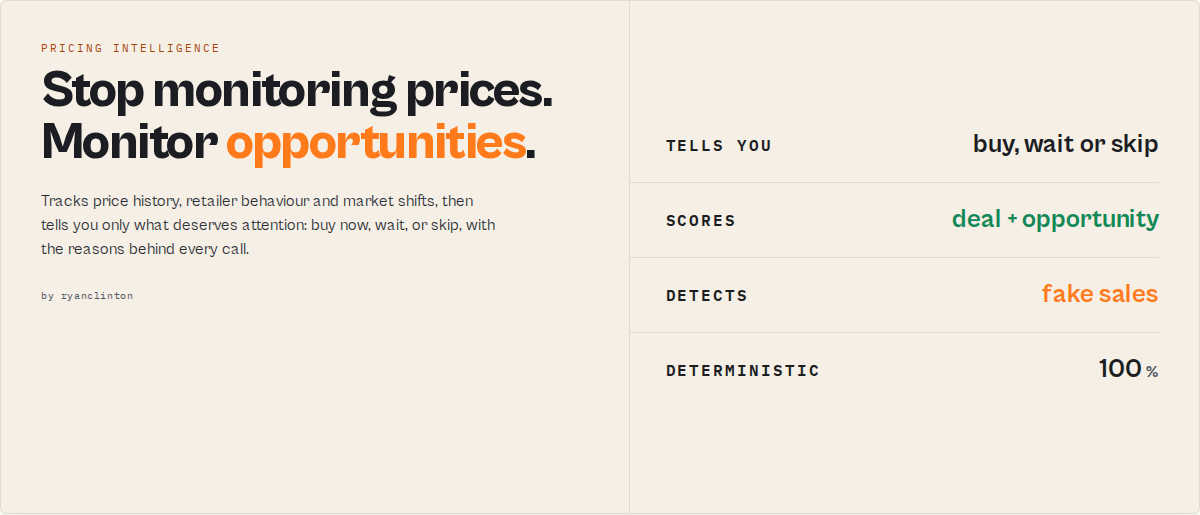
Stop monitoring prices. Start monitoring opportunities.
Most price monitors create work. They tell you a price changed, a product is back in stock, a competitor dropped 5%, then leave you to decide what matters. This actor does the opposite: it builds price history, retailer-behaviour models, opportunity signals and market intelligence over time, then surfaces only what deserves attention.
- Instead of 5,000 price alerts, you get a ranked action queue.
- Instead of price data, you get decisions.
- Instead of monitoring products, you monitor opportunities.
Works on one Shopify store or product page, or a 500-SKU multi-retailer portfolio.
A new category: opportunity intelligence
Price monitoring tells you what changed. Opportunity intelligence tells you what matters. This actor belongs to the second category. Every score, signal and model below exists for one purpose: to reduce thousands of price changes into a handful of actions.
Who this is for
- Buyers & deal hunters — find genuine deals, avoid fake sales, and know when to buy versus wait.
- E-commerce operators & repricers — monitor competitor pricing behaviour, spot aggressive discounting, and catch market shifts.
- Agencies & dropshippers — track hundreds of products and surface only the meaningful changes. Instead of 5,000 alerts, you get a ranked action queue.
- Analysts & researchers — generate retailer, category and market intelligence from one API call.
What it answers that other tools can't
| Question | A typical price monitor | This actor |
|---|---|---|
| Did the price change? | ✓ | ✓ |
| Is this a real sale? | ✗ | ✓ |
| Is this retailer usually this aggressive? | ✗ | ✓ |
| Is this a rare (once-a-year) opportunity? | ✗ | ✓ |
| Should I buy now or wait? | ✗ | ✓ |
| What deserves attention today? | ✗ | ✓ |
| What's happening across the market? | ✗ | ✓ |
What it monitors
✓ Products ✓ Retailers ✓ Competitors ✓ Categories ✓ Portfolios ✓ Markets
Why most price-monitoring tools fall short
| Problem | A typical price monitor | This actor |
|---|---|---|
| Too many alerts | every change fires one | only meaningful opportunities surface (attention.required) |
| No historical context | current price only | persistent per-product price intelligence |
| Fake sales look real | trusts the compare-at price | detects inflate-then-discount (promotionIntegrity) |
| No competitor intelligence | shows price changes | models competitor behaviour (competitorBehaviour) |
| No prioritisation | flat product list | ranked actionQueue + attention severity |
| No market visibility | product-level only | product, retailer, category & market records |
Before vs after
Without this actor, a 500-product run is ~67 price alerts + ~12 stock alerts + ~3 competitor changes, and you still have to decide what matters. With it:
Attention required: 4
  1. Historical low — Men's Tree Runners
  2. Rare opportunity (once-per-year) — Wool Runner
  3. Aggressive competitor discounting — group "Running Shoes"
  4. Back in stock — Trail Runner SWT
Everything else: ignore until it matters.
Filter the dataset on attention.required = true and that whole 500-product run collapses to the few records that matter:
{
  "attentionRequired": 4,
  "opportunities": [
    { "severity": "critical", "reason": "Historical low", "exceptionType": "historical-low" },
    { "severity": "high", "reason": "Aggressive competitor discounting" },
    { "severity": "medium", "reason": "Rarely-seen low price" },
    { "severity": "high", "reason": "Back in stock", "exceptionType": "back-in-stock" }
  ]
}
What you get
Three things, in order of importance:
- Attention — what deserves your attention today (
attention.required+severity). The antidote to alert fatigue: instead of 5,000 alerts, a ranked action queue. - Decision — buy now / wait / watch / overpriced (
priceDecision+opportunityScore+buyWindow). - Intelligence — every score, signal and model that explains why (detailed below).
Core signals (advanced)
The hero fields are attention (what to look at) and opportunityScore / priceDecision (what to do). Everything else explains why, grouped by lens:
Opportunity intelligence — opportunityScore (0-100 timing axis), priceDecision (buy-now / good-deal / watch / wait / overpriced), buyWindow (open / closing / closed + days remaining), opportunityRarity (first-time / rare + once-per-year cadence + days since last occurrence), opportunityContext, and inactionRisk — the counterfactual: what does waiting cost you?
Pricing intelligence — dealScore + dealScoreBreakdown (always answer "why 88?"), priceIntelligence (low / high / avg / median, a historicalPercentile + human band so "cheaper than 92% of its history" reads at a glance, near-low, recovery-from-low, anomalies), momentum (7d/30d + accelerating direction), discountVelocity, pricingPattern (cyclical / volatile / steady), promotionIntegrity (fake-sale detection), and seasonality ("17% cheaper than usual for June", once history spans calendar months).
Risk & change — riskProfile is the consumable abstraction over the raw signals (priceReboundRisk / stockoutRisk / fakeSaleRisk bands); plus changeFlag, stockSignal, scarcitySignals (restocks + stockout frequency), and confidence with plain-English reasons[].
Routing — attention (required + severity + typed exceptionType + ignoreForDays), alertPriority, and recommendedAction + reasons[] + summary (paste-ready).
Plus a run-level summary record (and KV SUMMARY mirror) with:
- a
portfolioStatenarrative (sale-heavy/stock-pressure/prices-rising/opportunity-rich/quiet/mixed) with the signals behind it, so you know what's happening across the whole watchlist in one read; - a 0-100 watchlist health score, counts of drops, restocks, products on sale and at their lowest-ever price, the biggest drop / best deal / best opportunity;
- per-store retailer DNA (sale frequency, average + largest discount, discount aggressiveness, pricing style, restock behaviour, storewide-sale event) so you learn how each retailer behaves, not just today's price;
- per-category intelligence (products on sale, average discount, average deal score per product category);
- a priority-sorted action queue.
Supply productGroups and you also get one group record per competitor set: market average / lowest / highest price, market spread, every member ranked cheapest-first (priceRank + vsMarketAvgPct), best current deal, biggest recent drop, group leader, and a competitorBehaviour read (market-share-grab / aggressive-discounting / selective-discounting / holding-price / premium), turning historical monitoring into competitive pricing intelligence.
The dataset isn't just products. Every run also emits entity records so you can model the market, not just individual prices:
recordType: "retailer"— one per monitored store, carrying its retailer DNA: sale frequency, average + largest discount, discount aggressiveness, pricing style, restock behaviour, apromotionReliabilityscore (how genuine its discounts are), and any current storewide-sale event. A 25% discount from a rare-discounter means something very different from a retailer that discounts every week, and this record tells you which you're dealing with.recordType: "marketPulse"— one per run, the state of discounting across everything you monitor:discount-heavy/normal/quiet, discount participation %, average discount, and how many retailers are discounting aggressively. Executive-level "what changed in the market this week?" in one record.
Questions this actor answers
- "Did any of the products I track drop in price since yesterday?"
- "Is this the cheapest this product has ever been?"
- "Which competitor SKUs just went on sale, and by how much?"
- "Did that out-of-stock item come back?"
- "Of the 400 products I monitor, which 6 should I actually look at today?"
- "Is this price a real deal, or just a small dip off an already-high price?"
- "Is this '20% off' a genuine discount or a fake inflate-then-discount sale?"
- "Is the buying window still open, or is the price already climbing back up?"
- "Has this price ever been this low before, or is this a once-a-year low?"
- "What's the overall state of my portfolio this week, and which competitor is discounting most aggressively?"
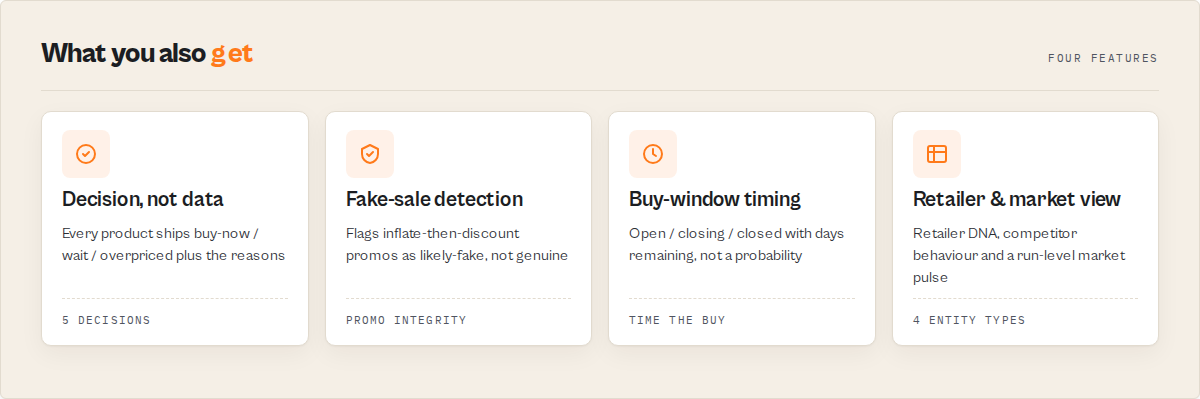
Why this is different
Most price scrapers stop at extraction: they give you currentPrice and leave the interpretation to you. You still have to store yesterday's prices somewhere, diff them, decide what a meaningful drop is, and figure out which moves matter. This actor does that interpretation for you, deterministically (no LLM, fully reproducible):
| A raw price scraper gives you | This actor gives you |
|---|---|
currentPrice: 98 | priceDecision: "buy-now", dealScore: 88, isAtLowestEver: true |
| You diff runs yourself | changeFlag: "PRICE_DROP", changePercent: -11 |
| You track history in your own DB | Built-in cross-run price history per product |
| A flat list of every product | A priority-sorted actionQueue of just what changed |
| "in stock: true" | stockSignal: "back-in-stock" |
Monitoring modes
Pick the mode that matches your job. It tunes which events become high-priority alerts and what lands in the action queue:
deal-hunting(buyer) — high-priority on price drops, buy-now signals, and restocks.repricing(seller) — high-priority on competitor drops AND rises, so you can react either way.stock-alert— high-priority only on back-in-stock / went-out-of-stock changes.market-intelligence— prioritises unusual moves (price anomalies, near-historical-lows, deep discounts, storewide sales) over routine single-product drops. Built for monitoring a market, not a wishlist.general(default) — balanced across drops, restocks, and good deals.
How it works
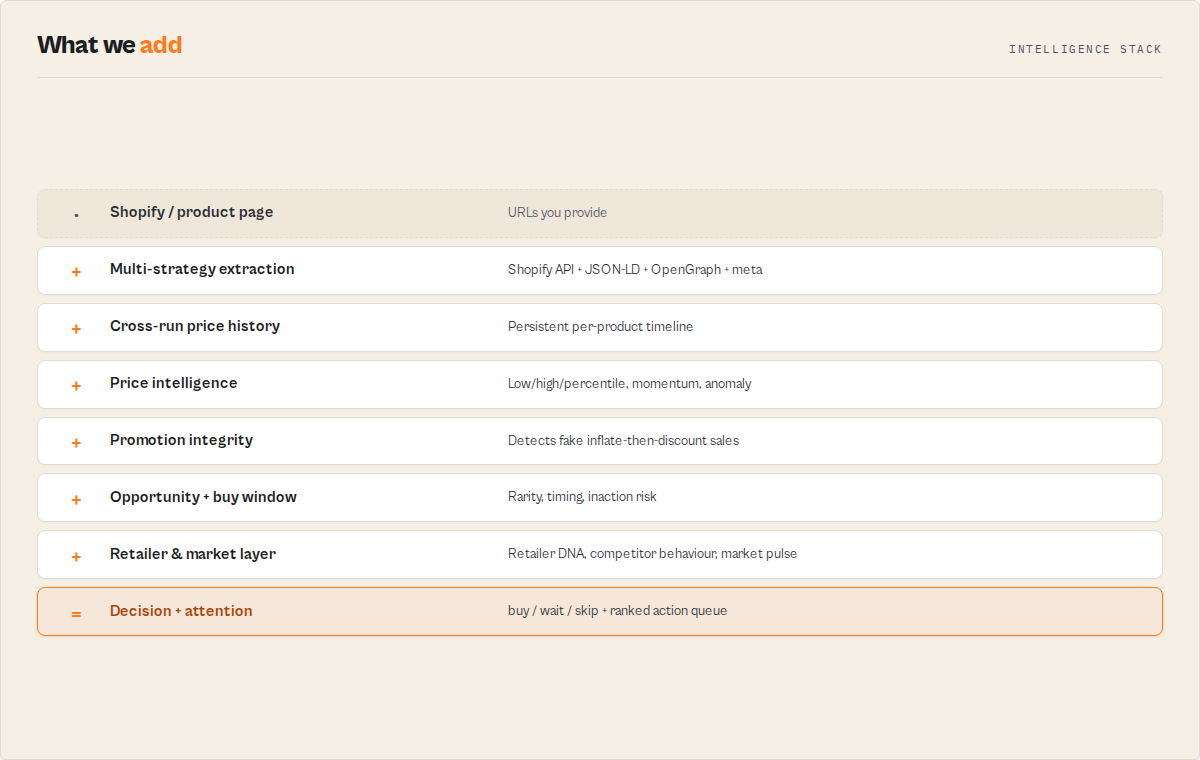
productUrls[]  ──►  for each store / product
                      │
                      ├─ Shopify store?  →  /products.json API (bulk, all variants + compare-at + stock)
                      │                       else ▼
                      └─ Generic page    →  JSON-LD → OpenGraph → product-meta → regex (first hit wins)
                      │
                      ▼
                load this product's price history  (named KV store, persists across runs)
                      │
                      ▼
                DECISION LAYER (deterministic)
                  price intelligence (low/high/avg/median, position, trend, volatility, anomaly)
                  discount vs compare-at / RRP
                  changeFlag + stockSignal vs last run
                  dealScore 0-100  →  priceDecision  →  recommendedAction + alertPriority
                      │
                      ▼
                stream the product row  +  save updated history  +  (PPE) charge once
                      │
                      ▼
                run summary record + KV SUMMARY  (drops, restocks, action queue, best deal)
The price-history store is keyed per product and persists between runs so the very first capture builds the baseline and every later run scores against it. Use the optional watchlistName input to keep independent histories for separate schedules.
Input
| Parameter | Type | Description |
|---|---|---|
productUrls | string[] | Shopify store root URLs (e.g. https://store.myshopify.com) and/or direct product page URLs. Up to 1,000 per run. |
monitorMode | select | general / deal-hunting / repricing / stock-alert. Tunes alerts + the action queue. Default general. |
priceDropAlertPct | integer | A move of at least this % vs the previous run flags PRICE_DROP / PRICE_RISE and raises priority. Default 5. |
watchlistName | string | Optional. Names an independent price-history watchlist so two schedules don't share history. |
outputProfile | select | minimal (decision fields only, for Zapier/Make rules) / standard (default) / full (incl. description, variants, tags). |
productGroups | array | Optional. Competitor groups [{ "name": "...", "urls": [...] }] for per-group market intelligence (market average, best deal, group leader). Products are also monitored individually. |
includePriceHistory | boolean | Attach each product's full tracked price-point timeline to its record. Default false. |
trackPriceHistory | boolean | Persist price history across runs for change detection. Default true. |
checkShopifyApi | boolean | Try the Shopify /products.json endpoint first. Default true. |
notifyOnChange | boolean | Log high-priority alerts prominently in the run log. Default false. |
currency | string | Fallback currency code when the site doesn't specify one. Default USD. |
maxProducts | integer | Cap on products per Shopify store URL. Default 100. |
Example: hunt for deals across a few stores
{
    "productUrls": [
        "https://www.allbirds.com",
        "https://www.gymshark.com/products/gymshark-arrival-5-shorts-black-ss22"
    ],
    "monitorMode": "deal-hunting",
    "priceDropAlertPct": 10,
    "watchlistName": "my-wishlist"
}
Example: competitor repricing watch (seller)
{
    "productUrls": ["https://competitor.myshopify.com"],
    "monitorMode": "repricing",
    "maxProducts": 500,
    "outputProfile": "minimal"
}
Example: competitor group intelligence
{
    "productGroups": [
        {
            "name": "Running Shoes",
            "urls": [
                "https://store-a.com/products/runner",
                "https://store-b.com/products/runner",
                "https://store-c.com/products/runner"
            ]
        }
    ],
    "monitorMode": "repricing"
}
Returns each product individually (tagged groupName: "Running Shoes") plus a recordType: "group" record with the market average price, the best current deal, the biggest recent drop, and the group leader by opportunity.
Output example
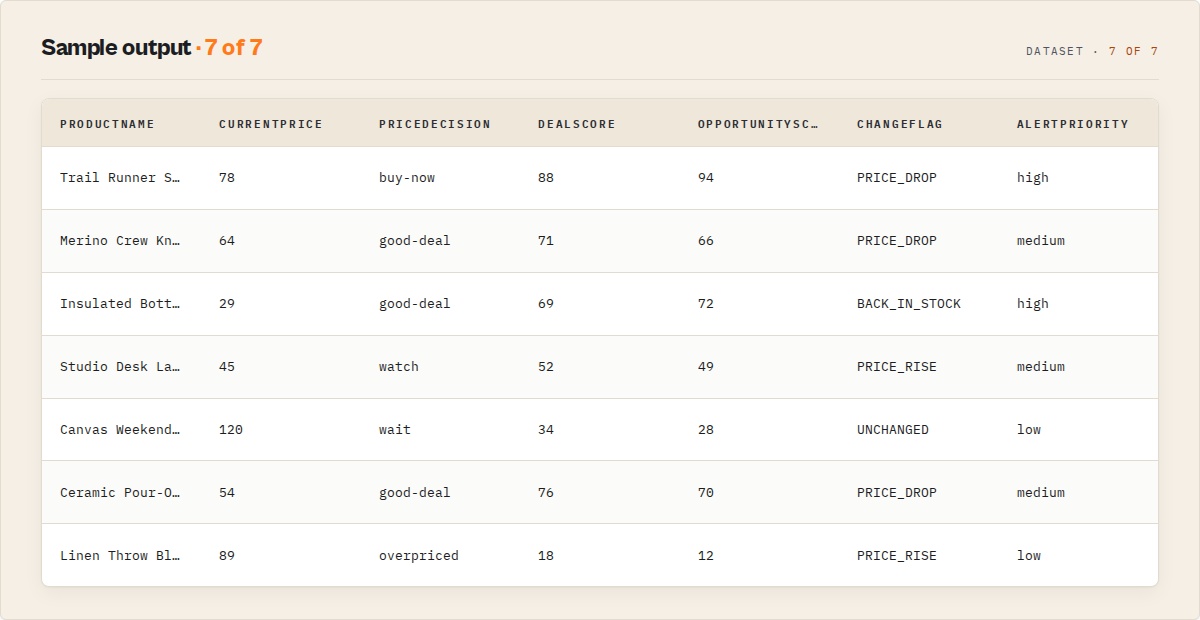
{
    "recordType": "product",
    "url": "https://allbirds.com/products/mens-tree-runners",
    "source": "shopify",
    "storeDomain": "allbirds.com",
    "productName": "Men's Tree Runners",
    "currentPrice": 78,
    "compareAtPrice": 110,
    "currency": "USD",
    "available": true,
    "priceDecision": "buy-now",
    "dealScore": 88,
    "dealScoreBreakdown": { "historicalPosition": 50, "compareAtDiscount": 17, "recentDrop": 8 },
    "opportunityScore": 94,
    "changeFlag": "PRICE_DROP",
    "stockSignal": "unchanged",
    "alertPriority": "high",
    "recommendedAction": "Strong buy signal: the current price is near or at its tracked low.",
    "reasons": ["At the lowest price tracked", "Price dropped 11%", "29% off the listed compare-at price", "Down 18% over 30 days and accelerating"],
    "summary": "Men's Tree Runners: buy now at USD 78.00. At the lowest price tracked.",
    "confidence": { "score": 90, "level": "high", "reasons": ["18 price observations", "24 days tracked", "stable pricing pattern"] },
    "scarcitySignals": { "restocksLast90Days": 2, "stockOutFrequencyPct": 12.5, "stockOutFrequency": "low" },
    "priceIntelligence": {
        "lowestPrice": 78, "highestPrice": 110, "averagePrice": 96, "medianPrice": 98, "priceStdDev": 11.4,
        "historicalPercentile": 6, "pricePositionLabel": "bottom-decile-price",
        "pricePositionPct": 0, "isAtLowestEver": true, "isNearHistoricalLow": true, "discountFromPeakPct": 29,
        "recoveryFromLowPct": null, "daysSinceLowestPrice": 0, "daysTracked": 24, "dataPoints": 18,
        "trend": "falling", "volatility": "medium", "anomaly": "price-drop"
    },
    "momentum": { "sevenDayPct": -6.0, "thirtyDayPct": -18.0, "direction": "accelerating-down" },
    "discountVelocity": { "dropsLast30Days": 3, "daysSinceLastDrop": 1, "avgDropPct": 7.2 },
    "pricingPattern": { "type": "cyclical", "averageCycleDays": 14, "confidence": "medium" },
    "futureDealProbability": { "betterPriceWithin30Days": 0, "basis": "historical-distribution" },
    "promotionIntegrity": { "score": 96, "classification": "genuine-discount", "reason": "Sale price is genuinely low (cheaper than 94% of its tracked history)." },
    "buyWindow": { "status": "open", "daysExpectedRemaining": 4, "confidence": "medium", "reason": "Cyclical low — typically rebounds within ~4 days." },
    "opportunityRarity": { "historicalOccurrence": 1, "frequency": "rare", "classification": "once-per-year", "daysSinceLastOccurrence": 348, "reason": "This price (or lower) has occurred 1 of 18 tracked observations, last 348 days ago." },
    "riskProfile": { "priceReboundRisk": "high", "stockoutRisk": "low", "fakeSaleRisk": "low" },
    "inactionRisk": { "score": 80, "reason": "Waiting risks missing this: rarely this low, window currently open." },
    "seasonality": { "currentVsExpectedPct": -17, "seasonalOpportunity": true, "bestMonthToBuy": "November", "basis": "monthly-history", "monthsObserved": 8 },
    "attention": { "required": true, "reason": "Rarely-seen low price.", "ignoreForDays": null, "severity": "medium", "exceptionType": "none" },
    "discount": { "fromCompareAtPct": 29.09, "onSale": true, "savingsAmount": 32 },
    "priceChange": { "previousPrice": 88, "changeAmount": -10, "changePercent": -11.36, "direction": "down", "lastChecked": "2026-06-07T08:30:00.000Z" }
}
The dataset's first view (Decisions) leads with priceDecision, dealScore, changeFlag, stockSignal, and alertPriority so the answer is visible in the first columns.
Use in Dify
Drop this actor into Dify workflows via the Apify plugin's Run Actor node. Each product returns scored, classified, and recommended as structured JSON: buy-now / good-deal / watch / wait / overpriced plus the alertPriority your downstream node branches on. A raw scraper pointed at the same store returns prices; this returns decisions.
- Actor ID:
ryanclinton/ecommerce-price-monitor - Sample input (deal-hunting across a wishlist):
{
    "productUrls": ["https://store.myshopify.com"],
    "monitorMode": "deal-hunting",
    "watchlistName": "dify-wishlist",
    "outputProfile": "minimal"
}
A Dify if/else node routes cleanly on the stable enums:
IF priceDecision == "buy-now"          → send a buy alert
ELIF changeFlag == "BACK_IN_STOCK"     → notify the requester
ELIF alertPriority == "high"           → push to the review queue
ELSE                                    → ignore
The reasons[] and summary strings are usable verbatim in the alert body, with no LLM rewriting needed. Opt-in modes (repricing, stock-alert) and the watchlistName watchlist let scheduled Dify workflows monitor the same catalogue over time.
How much does it cost
This actor is pay-per-event: you are charged $0.05 per product monitored (only for products where a real price resolved; failed or empty extractions are never charged). Platform compute is billed separately by Apify and is minimal because the actor uses API calls and lightweight HTML parsing, not browser rendering.
| Scenario | Products monitored | PPE charge |
|---|---|---|
| One product page | 1 | $0.05 |
| Small Shopify store | 50 | $2.50 |
| A 200-SKU competitor watch | 200 | $10.00 |
Set maxProducts to cap how many products a large store contributes, and outputProfile: "minimal" to keep payloads small for automation.
What matters, not what changed
Most price-monitoring tools answer "what changed?". This actor answers "what matters?". In practice that is the difference between:
- 5,000 alerts, 500 products, 50 competitors
and:
- 4 opportunities, 2 risks, 1 decision
Every score, signal, model and intelligence layer in this actor exists for that one purpose: to reduce thousands of changes into a handful of actions.
What this actor does NOT do
- It does not render JavaScript. Single-page-app stores that inject prices with JS are detected and reported as
failureType: "js-required", not silently dropped. Use a browser-based scraper for those. - It does not beat aggressive anti-bot marketplaces. Amazon, eBay, and Walmart use heavy bot defences; pages that block automated access are reported as
failureType: "blocked"with a proxy hint. Use a dedicated marketplace scraper instead. - It does not compare prices across different stores.
dealScoreis relative to each product's own tracked history and its store's compare-at price, not a cross-retailer "cheapest on the internet" claim (that would need a market-wide price corpus this actor doesn't hold). - It does not convert currencies. It reports the currency each site exposes and falls back to your
currencyinput when absent. - It does not access products behind a login or password-protected storefront.
Related actors
| Actor | Use case |
|---|---|
| ryanclinton/shopify-store-intelligence | Full catalogue, tech-stack, theme, and bestseller analysis for a Shopify store |
| ryanclinton/website-change-monitor | Detect any change on a web page (layout, content, links), beyond price |
| ryanclinton/website-tech-stack-detector | Identify the e-commerce platform powering any store |
FAQ
How does price-history tracking work?
With trackPriceHistory enabled (the default), the actor stores each product's recent prices and stock status in a named Key-Value store that persists between runs. On the next run it scores the current price against that history (lowest, highest, average, position-in-range) and flags drops, rises, and stock changes. The first run builds the baseline, so priceDecision reads new until the second run.
What's the difference between dealScore and discount.fromCompareAtPct?
discount.fromCompareAtPct is the discount the store itself advertises (current vs compare-at / RRP). dealScore is the actor's own 0-100 verdict that also factors in where the price sits in its tracked history and any fresh drop, so a product can be "on sale" off an inflated RRP yet still score low if it's been cheaper before.
Can I monitor products from multiple stores in one run? Yes. Mix Shopify store URLs and individual product page URLs (up to 1,000). Each is processed independently and duplicates are skipped automatically.
Does it work with Amazon, eBay, or Walmart?
No. Those marketplaces use aggressive anti-bot measures; blocked pages are reported with failureType: "blocked". Use a dedicated marketplace scraper for them.
How often should I schedule runs?
Daily works for most use cases and builds rich history. For flash sales, run every few hours. Use a distinct watchlistName per schedule so histories stay separate.
Is scraping product prices legal? Product prices are publicly visible to any site visitor. This actor accesses only public data and does not bypass authentication or access controls. See Apify's guide on web scraping legality for general guidance.
Deliver alerts to Slack and Notion (MCP connectors)
Send each run's price alerts straight into your own Slack or Notion via Apify MCP connectors. Set notionConnector or slackConnector and the run delivers the drop/rise/restock counts, the biggest drop and best deal, and the action queue. Your credentials stay encrypted on your Apify account; the actor never sees your Slack or Notion token.
- Slack — posts a price-alert digest plus the action queue to a channel. One-click OAuth in Apify Console → Settings → MCP connectors.
- Notion — archives each run.
notionArchiveProfile: per-productwrites one page per flagged product; the defaultsummarywrites one page per run. deliverTopNbounds how many products are sent (default 10); the full set always stays in the dataset.
Schedule the monitor with a watchlistName and every run posts only what changed to your channel or Notion. Delivery is additive — unset connectors and the actor behaves exactly as before; each run records a deliveries block on its SUMMARY.
Integrations
Compare this actor
Related actors
Bulk Email Verifier — MX, SMTP & Disposable Detection at Scale
Verify email deliverability in bulk — MX records, SMTP mailbox checks, disposable detection (55K+ domains), role-based flagging, catch-all detection, domain health scoring (SPF/DKIM/DMARC), and confidence scores. $0.005/email, no subscription.
CFPB Complaint Intelligence — Vendor Risk & Screening
Turn 5M+ CFPB consumer complaints into decisions: screen companies pass / review / fail, score complaint-handling risk, monitor what changed since last run, benchmark cohorts, and build audit-ready due-diligence packs. Filter by company, product, state, and date. No API key.
Company Deep Research — SEC, GitHub, DNS & Social
Research any company from a domain. Get website metadata, Wikipedia summary, GitHub repos & stars, SEC EDGAR filings & ticker, academic papers, DNS records, and social media profiles in one JSON report.
SEC EDGAR Filing Search & Signal Engine — Risk, Events & Alerts
Search, rank, and monitor SEC EDGAR filings by keyword, company, or ticker. Every result carries an event category (8-K taxonomy), risk flags, and a signal score; watchlists add cross-filing pattern alerts. Filter by form type and date. Structured JSON with direct document links.
Ready to try E-Commerce Price Tracker — Deal & Opportunity Intelligence?
Run it on your own Apify account. Apify offers a free tier with $5 of monthly credits.
Open on Apify Store